Back to Products
 0.0 (0 reviews)
Featured
Bestseller
Expert Advisors
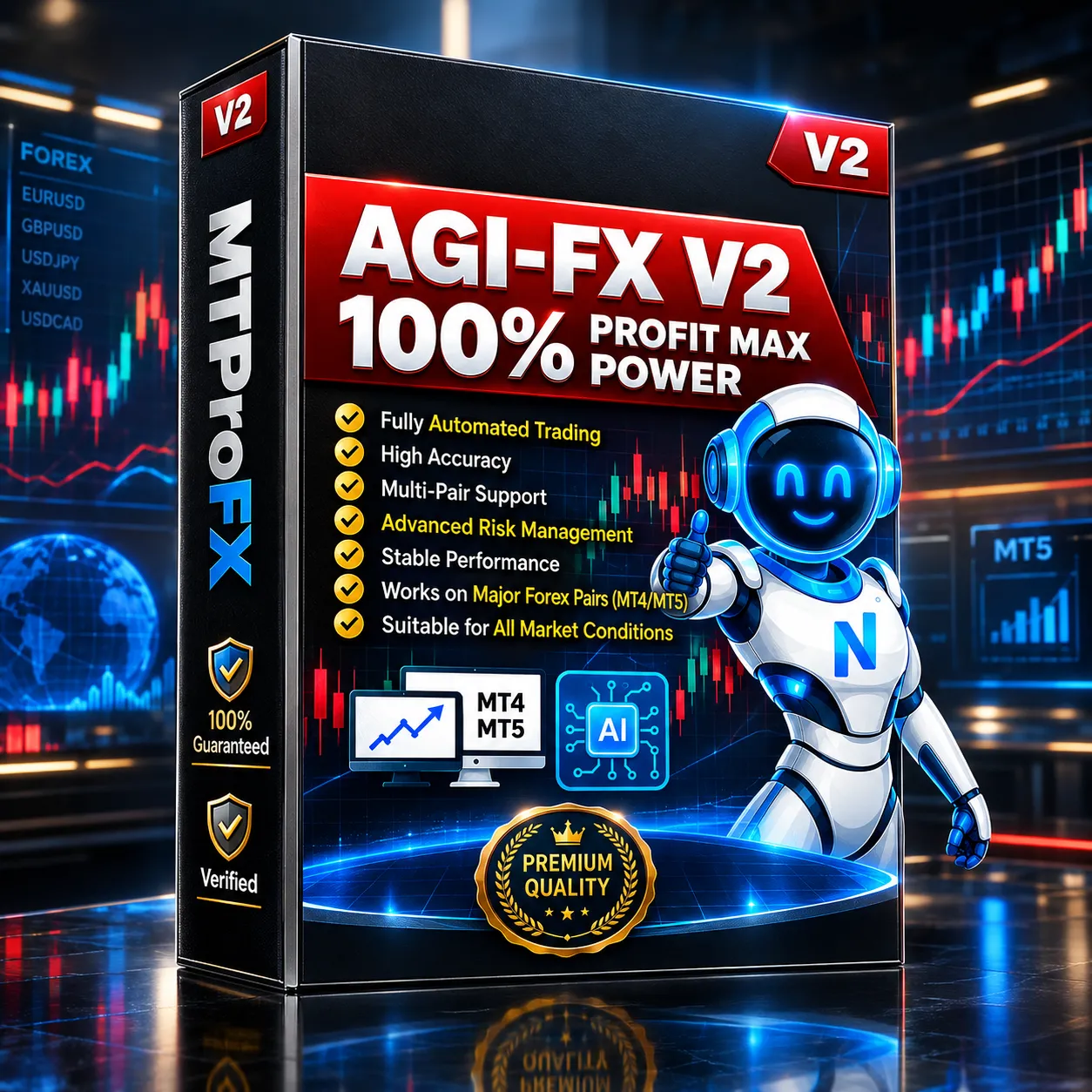
Agi FX EA MT5 V2 – Powerful Automated Forex Trading Expert Advisor
$265.00
$16.99
93.59% OFF☑️ Agi FX EA MT5 V2 is an automated Forex Expert Advisor designed for the MetaTrader 5 platform. It helps traders automate market analysis and trade execution according to its programmed trading logic, reducing the need for manual order management. The EA can be configured for different currency pairs, timeframes, risk levels, and trading preferences. Note: Exact performance depends on broker conditions, spread, leverage, market volatility, and the selected settings. Always test an EA on a demo account before using real funds.
What is Agi FX EA MT5 V2?
☑️ Agi FX EA MT5 V2 is an automated Forex Expert Advisor designed for the MetaTrader 5 platform. It helps traders automate market analysis and trade execution according to its programmed trading logic, reducing the need for manual order management. The EA can be configured for different currency pairs, timeframes, risk levels, and trading preferences.
Recommended Trading Currency Pairs
Agi FX EA MT5 V2 can be tested across major and selected minor Forex pairs. Common pairs to consider include:
☑️ EUR/USD – High liquidity and generally tight spreads.
☑️ GBP/USD – Suitable for traders looking for greater intraday movement.
☑️ USD/JPY – A widely traded major pair with strong liquidity.
☑️ AUD/USD – Popular for diversified Forex testing.
☑️ USD/CAD – Can provide additional diversification.
☑️ EUR/GBP – Useful for testing the EA on a cross pair.
☑️ XAU/USD (Gold) – If supported by the EA and broker, it can be tested separately because its volatility differs significantly from traditional currency pairs.
The best pair ultimately depends on the EA's intended configuration and your broker's trading conditions. Avoid assuming that one preset will perform identically across every instrument.
☑️ EUR/USD – High liquidity and generally tight spreads.
☑️ GBP/USD – Suitable for traders looking for greater intraday movement.
☑️ USD/JPY – A widely traded major pair with strong liquidity.
☑️ AUD/USD – Popular for diversified Forex testing.
☑️ USD/CAD – Can provide additional diversification.
☑️ EUR/GBP – Useful for testing the EA on a cross pair.
☑️ XAU/USD (Gold) – If supported by the EA and broker, it can be tested separately because its volatility differs significantly from traditional currency pairs.
The best pair ultimately depends on the EA's intended configuration and your broker's trading conditions. Avoid assuming that one preset will perform identically across every instrument.
Agi FX EA MT5 V2 Features
Automated Trading - Agi FX EA MT5 V2 is designed to automate trade execution through MetaTrader 5, allowing the trading system to operate without manually opening and closing every position.
Configurable Parameters - Users can adjust available EA parameters to match their preferred risk management, trading frequency, and market conditions.
Multi-Pair Testing - The EA can be evaluated on multiple Forex instruments to determine which markets are most compatible with its strategy.
Timeframe Flexibility - Depending on the EA's configuration, traders can test different MT5 timeframes and identify settings that fit their trading approach.
MetaTrader 5 Compatibility - The product is designed for MT5, making it suitable for traders who use MetaTrader 5 as their automated trading environment.
Fully Automated Execution - Once properly configured and activated, the EA can monitor the market and execute trades according to its programmed rules.
Agi FX EA MT5 V2 – Best Settings
There is no single setting that is universally "best" for Agi FX EA MT5 V2 because Forex market conditions continuously change.
For a safer configuration process:
☑️ Start with the default EA parameters.
☑️ Select a liquid currency pair such as EUR/USD.
☑️ Begin with a suitable timeframe recommended by the product documentation.
☑️ Use conservative risk settings during initial testing.
☑️ Run a historical backtest using quality broker data.
☑️ Forward-test the configuration on a demo account.
☑️ Compare results across different market periods.
☑️ Only consider live deployment after evaluating drawdown, trade frequency, spread sensitivity, and overall consistency.
Avoid optimizing the EA exclusively for one historical period. Excessive optimization can create curve-fitting, where a configuration performs well historically but struggles under new market conditions.
For a safer configuration process:
☑️ Start with the default EA parameters.
☑️ Select a liquid currency pair such as EUR/USD.
☑️ Begin with a suitable timeframe recommended by the product documentation.
☑️ Use conservative risk settings during initial testing.
☑️ Run a historical backtest using quality broker data.
☑️ Forward-test the configuration on a demo account.
☑️ Compare results across different market periods.
☑️ Only consider live deployment after evaluating drawdown, trade frequency, spread sensitivity, and overall consistency.
Avoid optimizing the EA exclusively for one historical period. Excessive optimization can create curve-fitting, where a configuration performs well historically but struggles under new market conditions.
Instructions for Installing Agi FX EA MT5 V2
☑️ Step 1: Install MetaTrader 5
Download and install the MetaTrader 5 trading platform from your broker or the official MetaTrader provider.
☑️ Step 2: Open the MT5 Data Folder
Inside MetaTrader 5, select:
File → Open Data Folder
☑️ Step 3: Locate the Experts Folder
Navigate to:
MQL5 → Experts
Place the Agi FX EA MT5 V2 EA file in this folder.
☑️ Step 4: Restart MetaTrader 5
Close and reopen MT5 so the Expert Advisor can be detected correctly.
☑️ Step 5: Open Navigator
Press Ctrl + N or open the Navigator window and locate the EA under Expert Advisors.
☑️ Step 6: Attach the EA
Open the desired chart and timeframe, then drag Agi FX EA MT5 V2 onto the chart.
☑️ Step 7: Configure Settings
Review the available parameters and configure risk, lot size, trading conditions, and other available options according to your testing plan.
☑️ Step 8: Enable Automated Trading
Make sure the Algo Trading function is enabled in MetaTrader 5.
☑️ Step 9: Monitor Performance
Allow the EA to operate on a demo account first and monitor trades, drawdown, spreads, and execution quality.
Download and install the MetaTrader 5 trading platform from your broker or the official MetaTrader provider.
☑️ Step 2: Open the MT5 Data Folder
Inside MetaTrader 5, select:
File → Open Data Folder
☑️ Step 3: Locate the Experts Folder
Navigate to:
MQL5 → Experts
Place the Agi FX EA MT5 V2 EA file in this folder.
☑️ Step 4: Restart MetaTrader 5
Close and reopen MT5 so the Expert Advisor can be detected correctly.
☑️ Step 5: Open Navigator
Press Ctrl + N or open the Navigator window and locate the EA under Expert Advisors.
☑️ Step 6: Attach the EA
Open the desired chart and timeframe, then drag Agi FX EA MT5 V2 onto the chart.
☑️ Step 7: Configure Settings
Review the available parameters and configure risk, lot size, trading conditions, and other available options according to your testing plan.
☑️ Step 8: Enable Automated Trading
Make sure the Algo Trading function is enabled in MetaTrader 5.
☑️ Step 9: Monitor Performance
Allow the EA to operate on a demo account first and monitor trades, drawdown, spreads, and execution quality.
Who Should Use Agi FX EA MT5 V2?
Agi FX EA MT5 V2 may be suitable for:
☑️ Forex traders interested in automated trading.
☑️ MT5 users who want to experiment with Expert Advisors.
☑️ Traders who want to reduce manual trade execution.
☑️ Algorithmic-trading beginners learning how EAs work.
☑️ Experienced traders who want to backtest an additional automated strategy.
☑️ Users who have access to VPS hosting and want continuous EA operation.
It may be less appropriate for users who expect guaranteed profits or want an EA that requires no testing, monitoring, or risk management.
☑️ Forex traders interested in automated trading.
☑️ MT5 users who want to experiment with Expert Advisors.
☑️ Traders who want to reduce manual trade execution.
☑️ Algorithmic-trading beginners learning how EAs work.
☑️ Experienced traders who want to backtest an additional automated strategy.
☑️ Users who have access to VPS hosting and want continuous EA operation.
It may be less appropriate for users who expect guaranteed profits or want an EA that requires no testing, monitoring, or risk management.
Download Agi FX EA MT5 V2
Download Agi FX EA MT5 V2Pros and Cons
Pros
Automated trading through MT5.
Reduces the need for constant manual execution.
Configurable trading parameters.
Suitable for backtesting and forward testing.
Can be evaluated across multiple currency pairs.
Compatible with MetaTrader 5 trading environments.
Cons
Results are not guaranteed.
Performance can vary between brokers.
Spread and slippage can affect execution.
Poorly optimized settings may increase risk.
Historical backtests do not guarantee future performance.
Requires monitoring and appropriate risk management.
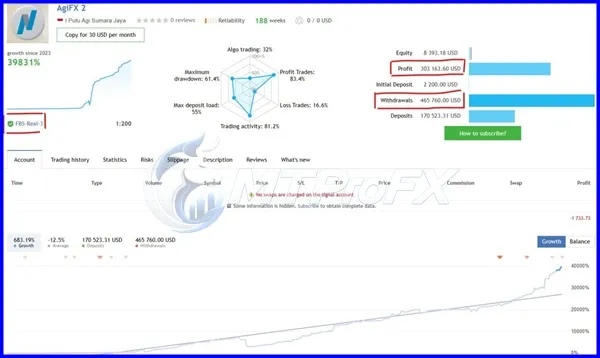
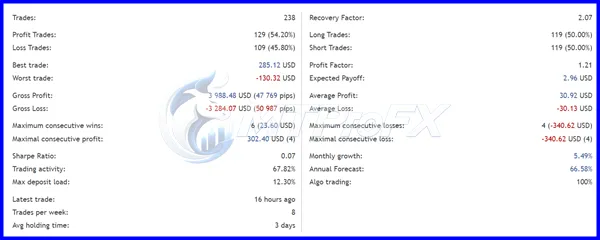
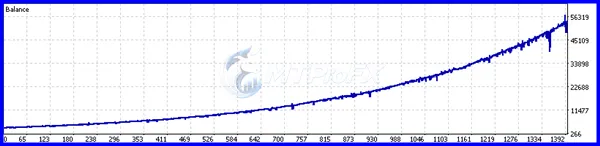
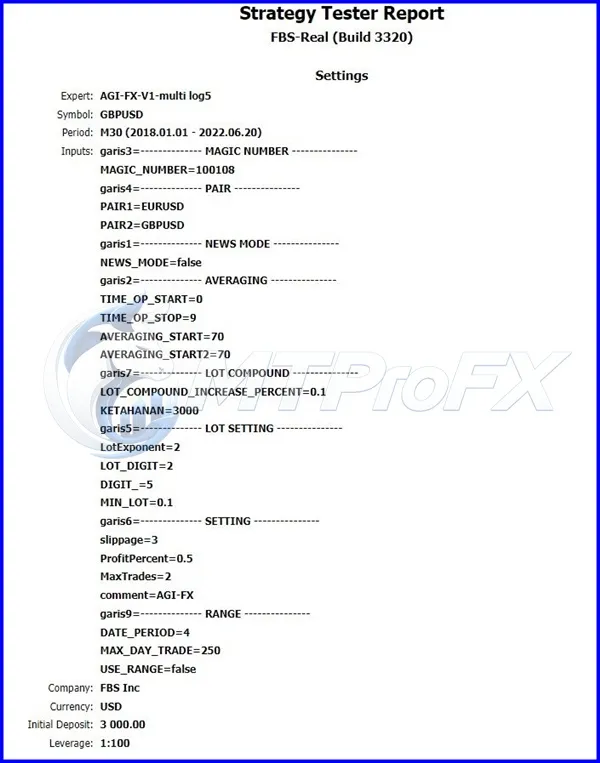
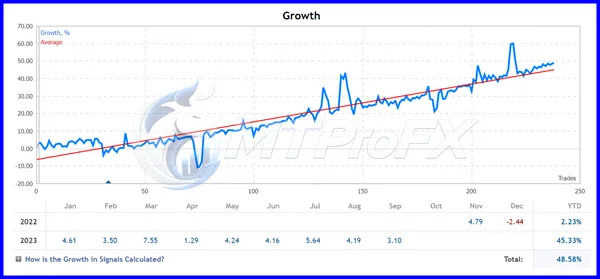
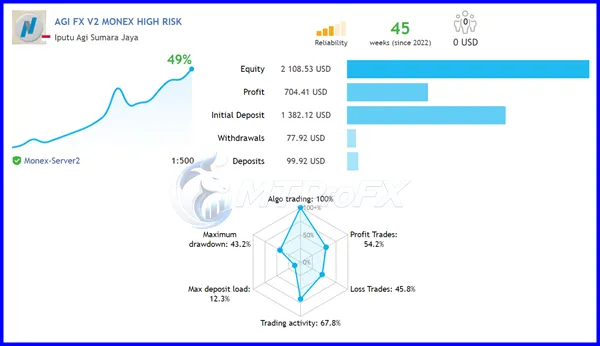
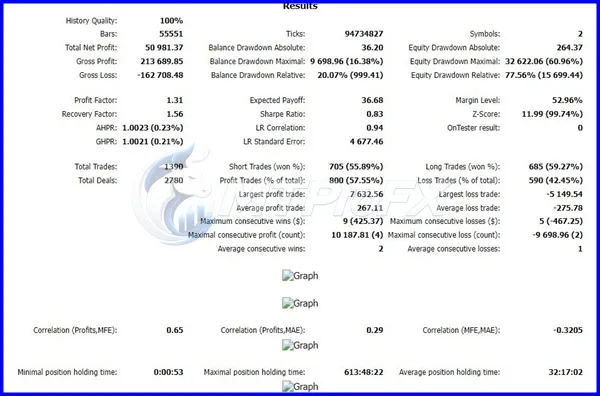
Backtest Results
Get Agi FX EA MT5 V2 FREE (VIP Members Only)
Join a VIP Telegram group to get access. Pick your plan:
Conclusion
☑️ Agi FX EA MT5 V2 provides an automated approach to Forex trading through MetaTrader 5. Its primary appeal is the ability to automate market monitoring and trade execution while giving users configurable parameters for testing different trading environments.
For the most responsible implementation, begin with backtesting → demo forward testing → conservative risk settings → live deployment only after thorough evaluation. Trading performance can vary significantly depending on market conditions and broker execution.
For the most responsible implementation, begin with backtesting → demo forward testing → conservative risk settings → live deployment only after thorough evaluation. Trading performance can vary significantly depending on market conditions and broker execution.
What's Included
File Size
51.7 KB
File Type
ZIP
Downloads
198
Login to add your review.
shenahmd@gmail.com
Sep 29, 2026
A useful addition to my automated trading tools. I prefer running it on a demo account first and gradually adjusting the parameters.
Agi FX EA MT5 V2 is an automated Forex Expert Advisor designed to operate on the MetaTrader 5 platform according to its programmed trading strategy.
No. No Expert Advisor can guarantee profits. Trading results depend on market conditions, broker execution, spread, slippage, leverage, risk settings, and other factors.
The product is designed for MetaTrader 5 (MT5).
There is no universally best pair. EUR/USD, GBP/USD, USD/JPY, AUD/USD, and other liquid instruments can be tested to determine which markets are compatible with the EA's strategy.
Yes, beginners can use it as an introduction to automated trading, but they should understand basic Forex risk management and begin with demo testing.
A VPS can be useful when continuous EA operation is required because it allows MetaTrader 5 to remain running even when the trader's personal computer is offline.
The available parameters depend on the specific EA version. Users should review the included settings and documentation before changing risk or trading parameters.
Yes. Backtesting can help evaluate how the EA behaves under historical market conditions. However, historical performance should not be treated as a guarantee of future results.
It can be evaluated for live trading after appropriate backtesting and forward testing, but users should determine their own risk limits and start conservatively.