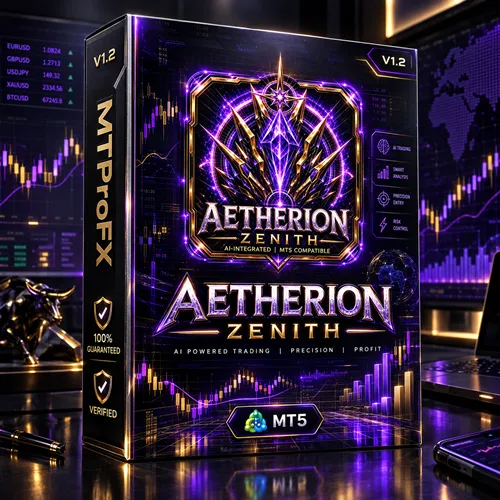
Atherion Zenith AI EA MT5 V1.2 – Smart Forex Trading & Automation Tool
$16.99
93.66% OFF☑️ The Atherion Zenith AI EA MT5 V1.2 is a MetaTrader 5 Expert Advisor designed for traders interested in automated forex trading. It offers a framework for running trading strategies with configurable parameters, allowing users to explore automated trade execution while monitoring market conditions and account risk. Before using this EA on a live account, traders should verify its actual trading logic, supported instruments, broker compatibility, and performance through backtesting and demo trading. The product name alone does not establish that it uses machine learning or artificial intelligence.
What is Atherion Zenith AI EA MT5 V1.2?
Before using this EA on a live account, traders should verify its actual trading logic, supported instruments, broker compatibility, and performance through backtesting and demo trading. The product name alone does not establish that it uses machine learning or artificial intelligence.
Recommended Trading Currency Pairs
☑️ EUR/USD: A widely traded major pair that often offers competitive spreads.
☑️ GBP/USD: A major pair with potentially stronger price movements and higher volatility.
☑️ USD/JPY: A liquid major pair influenced by economic data and central bank decisions.
☑️ AUD/USD: A major pair affected by commodity markets and economic developments.
☑️ USD/CAD: A pair influenced by US and Canadian economic conditions, including oil prices.
☑️ EUR/JPY: A cross-currency pair that can experience substantial price movements.
☑️ Recommendation: Start with one pair on a demo account. Confirm that the EA supports the selected symbol, timeframe, and broker specifications before expanding to additional instruments.
Atherion Zenith AI EA MT5 V1.2 Features
Atherion Zenith AI EA MT5 V1.2 – Best Settings
Recommended starting approach
☑️ Trading timeframe: Begin by testing M15 or H1 if supported by the EA.
☑️ Currency pair: Start with EUR/USD or another verified supported instrument.
☑️ Risk per trade: Consider a conservative risk limit of 0.25%–0.5% of account equity, provided the EA allows risk-based position sizing.
☑️ Stop-loss: Use a protective stop-loss if supported and appropriate for the strategy.
☑️ Take-profit: Test suitable profit targets against historical volatility and transaction costs.
☑️ Maximum open trades: Keep exposure limited while learning how the EA behaves.
☑️ Trading sessions: Test London and New York sessions separately if the strategy depends on intraday volatility.
☑️ News trading: Disable news-sensitive trading initially unless the EA's behavior around major economic releases has been evaluated.
☑️ Maximum drawdown: Establish a predefined account-level loss threshold and stop trading if it is breached.
These are general testing suggestions, not confirmed Atherion Zenith EA presets. Grid, martingale, averaging, or recovery strategies may carry substantially greater risk than their initial position sizes suggest.
Instructions for Installing Atherion Zenith AI EA MT5 V1.2
Step 1. Download the EA: Obtain the Atherion Zenith AI EA MT5 V1.2 files from the official or authorized source.
Step 2. Open MetaTrader 5: Launch your trading platform.
Step 3. Open the Data Folder: Select File → Open Data Folder.
Step 4. Locate the Experts Folder: Navigate to MQL5 → Experts.
Step 5. Copy the EA Files: Place the supplied EA files in the appropriate folder. Follow the developer's instructions if the package includes additional dependencies.
Step 6. Refresh the Navigator: Return to MT5 and refresh the Expert Advisors section, or restart the terminal.
Step 7. Attach the EA: Open a supported chart and drag the EA onto it.
Step 8. Configure the Inputs: Review the available parameters, position sizing, and risk controls.
Step 9. Enable Automated Trading: Allow algorithmic trading only after checking the EA's permissions and configuration.
Step 10. Test Before Going Live: Run a backtest where possible, then use a demo account to evaluate live market behavior.
Important: A successful installation does not guarantee profitability. Check the Experts and Journal tabs for errors and verify that the EA is operating as intended.
Who Should Use Atherion Zenith AI EA MT5 V1.2?
☑️ Forex traders exploring automation: Users who want to test automated strategies instead of placing every trade manually.
☑️ MetaTrader 5 users: Traders who already understand the MT5 platform and its trading settings.
☑️ Strategy testers: Users interested in historical testing and performance analysis.
☑️ Busy traders: People who want to evaluate automated execution while still monitoring their accounts.
☑️ Risk-conscious learners: Traders willing to begin on a demo account and establish clear risk limits.
It may be unsuitable for beginners who expect guaranteed profits, traders unable to tolerate losses, or users who cannot monitor the EA and understand its potential exposure.
Download Atherion Zenith AI EA MT5 V1.2
Download Atherion Zenith AI EA MT5 V1.2Pros and Cons
Pros
Cons
Backtest Results
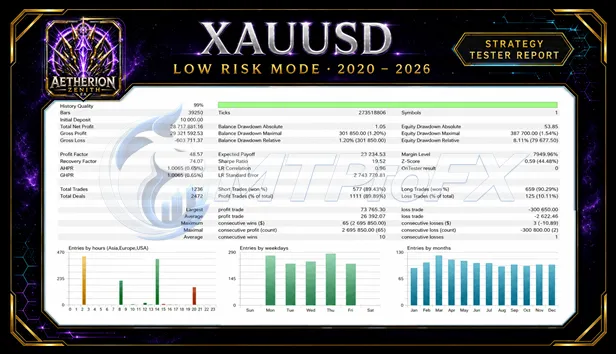
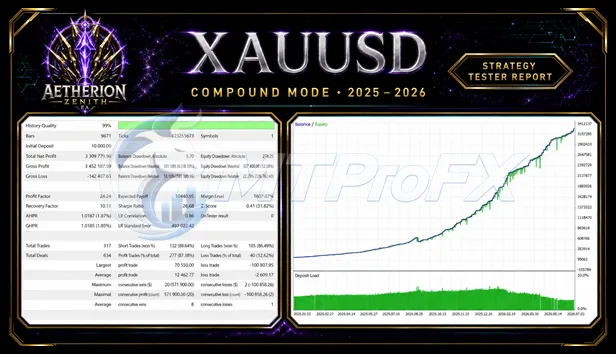
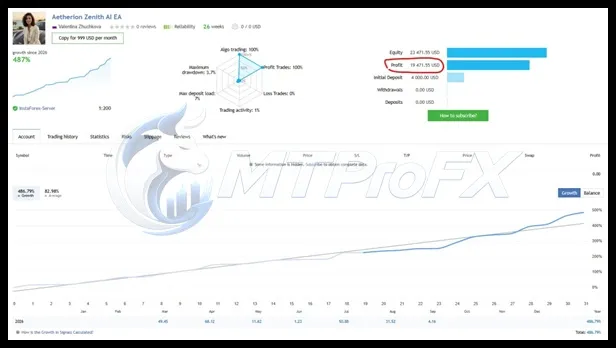
Get Atherion Zenith AI EA MT5 V1.2 FREE (VIP Members Only)
Join a VIP Telegram group to get access. Pick your plan:
Conclusion
For traders comparing forex EAs, transparent strategy documentation, independently verifiable results, and reliable risk controls are more useful indicators than promotional claims alone.
Risk disclaimer: Forex trading carries substantial financial risk. Backtested and simulated results do not guarantee future performance. Only trade money you can afford to lose.
What's Included
Login to add your review.
The MT5 setup process was straightforward. I would recommend testing the EA on a demo account before using real funds.