Back to Products
 0.0 (0 reviews)
Featured
Bestseller
Expert Advisors
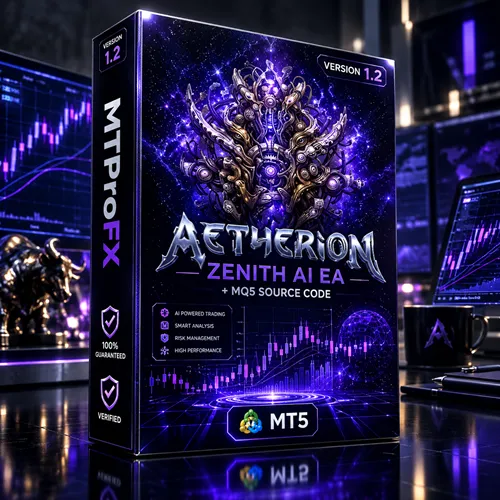
Atherion Zenith AI EA MT5 + MQ5 Source Code | AI Trading Robot
$230.00
$16.99
92.61% OFF☑️ Atherion Zenith AI EA MT5 + MQ5 Source Code is an Expert Advisor package designed for automated trading on MetaTrader 5. Explore its trading automation capabilities, configurable settings, technical analysis features, risk management options, and source code for users who want to examine or customize their trading tools. Actual performance depends on market conditions, broker execution, and configuration.
What is Atherion Zenith AI EA MT5 + MQ5 Source Code?
☑️ Atherion Zenith AI EA MT5 is an automated trading tool designed for the MetaTrader 5 (MT5) platform. It is intended to help traders automate trading activities and manage their strategies through configurable parameters rather than manually placing every trade.
The package includes MQ5 source code, which can be useful for traders and developers who want to inspect the program logic or explore potential customizations. The exact strategies, indicators, and automation rules should be confirmed from the product documentation before use.
Whether you are exploring automated forex trading or expanding your existing MT5 toolkit, it is important to understand the Expert Advisor's settings and test its behavior before using it on a live account.
The package includes MQ5 source code, which can be useful for traders and developers who want to inspect the program logic or explore potential customizations. The exact strategies, indicators, and automation rules should be confirmed from the product documentation before use.
Whether you are exploring automated forex trading or expanding your existing MT5 toolkit, it is important to understand the Expert Advisor's settings and test its behavior before using it on a live account.
Recommended Trading Currency Pairs
The most suitable trading instruments depend on the EA's underlying strategy, spread requirements, volatility tolerance, and supported symbols. Unless the developer's documentation confirms specific pairs, the following are candidates to evaluate during testing rather than guaranteed recommendations.
☑️ EURUSD
EURUSD is one of the most widely traded forex pairs. Its liquidity makes it a useful starting point when evaluating an Expert Advisor's execution and sensitivity to spreads.
☑️ GBPUSD
GBPUSD can experience stronger price movements than some major currency pairs. Test the EA carefully during volatile market sessions and around significant economic announcements.
☑️ USDJPY
USDJPY offers another major-currency market for evaluating automated trading behavior. Pay attention to changing volatility and trading conditions around important Japanese and US economic releases.
☑️ AUDUSD
AUDUSD may be worth testing if the EA supports the pair and performs appropriately under its market conditions.
☑️ XAUUSD (Gold)
Gold is popular among automated trading enthusiasts because of its substantial price movements. However, gold can experience sharp reversals, wider spreads, and rapid price changes. Confirm that the EA explicitly supports XAUUSD before testing it.
Important: These instruments are candidates for evaluation, not verified compatible symbols. Begin with the pairs specified in the official product documentation, if available.
☑️ EURUSD
EURUSD is one of the most widely traded forex pairs. Its liquidity makes it a useful starting point when evaluating an Expert Advisor's execution and sensitivity to spreads.
☑️ GBPUSD
GBPUSD can experience stronger price movements than some major currency pairs. Test the EA carefully during volatile market sessions and around significant economic announcements.
☑️ USDJPY
USDJPY offers another major-currency market for evaluating automated trading behavior. Pay attention to changing volatility and trading conditions around important Japanese and US economic releases.
☑️ AUDUSD
AUDUSD may be worth testing if the EA supports the pair and performs appropriately under its market conditions.
☑️ XAUUSD (Gold)
Gold is popular among automated trading enthusiasts because of its substantial price movements. However, gold can experience sharp reversals, wider spreads, and rapid price changes. Confirm that the EA explicitly supports XAUUSD before testing it.
Important: These instruments are candidates for evaluation, not verified compatible symbols. Begin with the pairs specified in the official product documentation, if available.
Atherion Zenith AI EA MT5 + MQ5 Source Code Features
Automated Trading on MT5 - An Expert Advisor can execute programmed trading rules through MetaTrader 5, reducing the need to place each trade manually. Actual capabilities depend on the EA's implementation and configuration.
MQ5 Source Code Included - The package is presented as including MQ5 source code. Source access may help technically experienced users inspect the program, investigate its logic, or explore modifications. Confirm that the supplied files contain the complete, usable source code.
Configurable Trading Parameters - MT5 Expert Advisors commonly provide adjustable inputs for controlling trading behavior. The available parameters for Atherion Zenith AI EA should be checked in its settings panel and documentation.
Technical Analysis Integration - Automated trading systems can use price data and technical indicators to evaluate market conditions. The specific indicators and entry or exit rules used by this EA have not been independently verified.
Risk Management Considerations - Trading risk depends on position sizing, stop-loss rules, account leverage, market volatility, and other factors. Review the EA's actual risk controls before trading and do not assume that capital protection is guaranteed.
Strategy Testing and Evaluation - MetaTrader 5 provides a Strategy Tester that can help users evaluate Expert Advisors using historical data. Testing quality depends on data accuracy, spread assumptions, commissions, and execution modeling.
Atherion Zenith AI EA MT5 + MQ5 Source Code – Best Settings
There is no universally optimal configuration for every broker, account size, and market environment. Start with the developer's recommended settings, if provided, and test changes systematically.
1. Start With the Default Parameters
Review the supplied documentation and begin with the recommended configuration. Avoid changing several parameters simultaneously, because doing so makes results harder to interpret.
2. Choose a Suitable Timeframe
The ideal timeframe depends on the EA's intended trading strategy. Confirm whether the software is designed for short-term, intraday, or longer-term trading before selecting a chart timeframe.
3. Use Conservative Position Sizing
Choose a lot size that keeps potential losses within an acceptable portion of your trading capital. A smaller position can help limit the financial impact of unfavorable trades, although it cannot eliminate risk.
4. Check Stop-Loss and Take-Profit Rules
Determine whether the EA uses fixed stop-loss and take-profit levels, dynamic exits, trailing stops, or another exit method. Never assume these controls are available without checking the actual settings.
5. Evaluate Broker Conditions
Spreads, commissions, slippage, execution speed, and minimum stop distances can affect automated trading results. Test the EA under conditions similar to those of your intended broker account.
6. Test Before Live Trading
Run historical backtests and forward tests on a demo account. Evaluate drawdown, trade frequency, average trade outcome, and performance across different market conditions rather than focusing only on net profit.
7. Avoid Unverified Preset Files
Use only settings that you understand and have tested. A preset that performs well in one historical period may perform poorly in a different market environment.
Recommended approach: Begin with a demo account, conservative risk, and the developer's documented configuration. Do not assume that any setting guarantees profits.
1. Start With the Default Parameters
Review the supplied documentation and begin with the recommended configuration. Avoid changing several parameters simultaneously, because doing so makes results harder to interpret.
2. Choose a Suitable Timeframe
The ideal timeframe depends on the EA's intended trading strategy. Confirm whether the software is designed for short-term, intraday, or longer-term trading before selecting a chart timeframe.
3. Use Conservative Position Sizing
Choose a lot size that keeps potential losses within an acceptable portion of your trading capital. A smaller position can help limit the financial impact of unfavorable trades, although it cannot eliminate risk.
4. Check Stop-Loss and Take-Profit Rules
Determine whether the EA uses fixed stop-loss and take-profit levels, dynamic exits, trailing stops, or another exit method. Never assume these controls are available without checking the actual settings.
5. Evaluate Broker Conditions
Spreads, commissions, slippage, execution speed, and minimum stop distances can affect automated trading results. Test the EA under conditions similar to those of your intended broker account.
6. Test Before Live Trading
Run historical backtests and forward tests on a demo account. Evaluate drawdown, trade frequency, average trade outcome, and performance across different market conditions rather than focusing only on net profit.
7. Avoid Unverified Preset Files
Use only settings that you understand and have tested. A preset that performs well in one historical period may perform poorly in a different market environment.
Recommended approach: Begin with a demo account, conservative risk, and the developer's documented configuration. Do not assume that any setting guarantees profits.
Instructions for Installing Atherion Zenith AI EA MT5 + MQ5 Source Code
Follow these general steps to install an Expert Advisor on MetaTrader 5. The exact process may vary depending on the files supplied with your purchase.
☑️ Step 1: Download the Product Files
Download the Atherion Zenith AI EA MT5 package from your purchase source. Extract the archive if the files are supplied in a ZIP folder.
☑️ Step 2: Open MetaTrader 5
Launch the MT5 trading platform on your computer.
☑️ Step 3: Open the Data Folder
In MetaTrader 5, select File → Open Data Folder.
☑️ Step 4: Locate the Expert Advisors Directory
Open the MQL5 folder, followed by the Experts folder.
☑️ Step 5: Copy the EA Files
Copy the supplied Expert Advisor files into the appropriate directory. If the package includes .mq5 source code, you can open it using MetaEditor. If a compiled .ex5 file is provided, place it in the appropriate Experts subfolder.
☑️ Step 6: Compile the Source Code if Required
If the supplied source code is intended to be compiled, open it in MetaEditor and use the Compile command. Resolve any compilation errors before proceeding. Source code does not necessarily compile successfully without the required dependencies.
☑️ Step 7: Refresh the Navigator
Return to MetaTrader 5 and refresh the Expert Advisors list, or restart the platform if necessary.
☑️ Step 8: Attach the EA to a Chart
Open a chart for a supported trading instrument and timeframe. Drag the EA onto the chart and review its input parameters.
☑️ Step 9: Enable Automated Trading
Enable the platform's Algo Trading function and check the EA's permissions. Follow the product documentation for any additional requirements.
☑️ Step 10: Verify Operation
Check the Experts and Journal tabs for error messages. Confirm that the EA is operating as expected on a demo account before considering live trading.
Installation note: Do not enable DLL imports or install additional components unless the official documentation explicitly requires them.
☑️ Step 1: Download the Product Files
Download the Atherion Zenith AI EA MT5 package from your purchase source. Extract the archive if the files are supplied in a ZIP folder.
☑️ Step 2: Open MetaTrader 5
Launch the MT5 trading platform on your computer.
☑️ Step 3: Open the Data Folder
In MetaTrader 5, select File → Open Data Folder.
☑️ Step 4: Locate the Expert Advisors Directory
Open the MQL5 folder, followed by the Experts folder.
☑️ Step 5: Copy the EA Files
Copy the supplied Expert Advisor files into the appropriate directory. If the package includes .mq5 source code, you can open it using MetaEditor. If a compiled .ex5 file is provided, place it in the appropriate Experts subfolder.
☑️ Step 6: Compile the Source Code if Required
If the supplied source code is intended to be compiled, open it in MetaEditor and use the Compile command. Resolve any compilation errors before proceeding. Source code does not necessarily compile successfully without the required dependencies.
☑️ Step 7: Refresh the Navigator
Return to MetaTrader 5 and refresh the Expert Advisors list, or restart the platform if necessary.
☑️ Step 8: Attach the EA to a Chart
Open a chart for a supported trading instrument and timeframe. Drag the EA onto the chart and review its input parameters.
☑️ Step 9: Enable Automated Trading
Enable the platform's Algo Trading function and check the EA's permissions. Follow the product documentation for any additional requirements.
☑️ Step 10: Verify Operation
Check the Experts and Journal tabs for error messages. Confirm that the EA is operating as expected on a demo account before considering live trading.
Installation note: Do not enable DLL imports or install additional components unless the official documentation explicitly requires them.
Who Should Use Atherion Zenith AI EA MT5 + MQ5 Source Code?
Atherion Zenith AI EA MT5 may be worth evaluating for the following users:
☑️ MT5 traders: Users who want to explore automated trading through MetaTrader 5.
☑️ Forex automation enthusiasts: Traders interested in testing algorithmic approaches to market participation.
☑️ MQ5 developers: Technically experienced users interested in inspecting or modifying the supplied source code, subject to its licensing terms.
☑️ Strategy testers: Users who want to evaluate an Expert Advisor using historical and demo-account data.
☑️ Experienced traders: Traders who understand spreads, slippage, drawdown, position sizing, and automated execution risks.
Who Should Be Cautious?
☑️ Beginners who do not understand trading risk should avoid deploying an unfamiliar EA on a live account. Traders seeking guaranteed profits, zero drawdown, or risk-free automation should understand that no Expert Advisor can reliably promise those outcomes.
☑️ MT5 traders: Users who want to explore automated trading through MetaTrader 5.
☑️ Forex automation enthusiasts: Traders interested in testing algorithmic approaches to market participation.
☑️ MQ5 developers: Technically experienced users interested in inspecting or modifying the supplied source code, subject to its licensing terms.
☑️ Strategy testers: Users who want to evaluate an Expert Advisor using historical and demo-account data.
☑️ Experienced traders: Traders who understand spreads, slippage, drawdown, position sizing, and automated execution risks.
Who Should Be Cautious?
☑️ Beginners who do not understand trading risk should avoid deploying an unfamiliar EA on a live account. Traders seeking guaranteed profits, zero drawdown, or risk-free automation should understand that no Expert Advisor can reliably promise those outcomes.
Download Atherion Zenith AI EA MT5 + MQ5 Source Code
Download Atherion Zenith AI EA MT5 + MQ5 Source CodePros and Cons
Pros
Designed for the MetaTrader 5 trading environment.
Includes MQ5 source code according to the product description.
Offers an opportunity to explore automated trading.
Can be evaluated using historical backtesting and demo trading.
May provide customization opportunities for users with appropriate programming knowledge.
Can reduce the need for manual trade entry when its automated functions are enabled.
Cons
Actual profitability has not been independently verified.
Results can vary with broker conditions and market volatility.
Source-code compilation may require additional dependencies or troubleshooting.
Incorrect configuration can lead to unexpected trades or losses.
Backtest results may not reflect future live performance.
The EA's exact strategy, supported pairs, and risk controls require confirmation from its documentation.
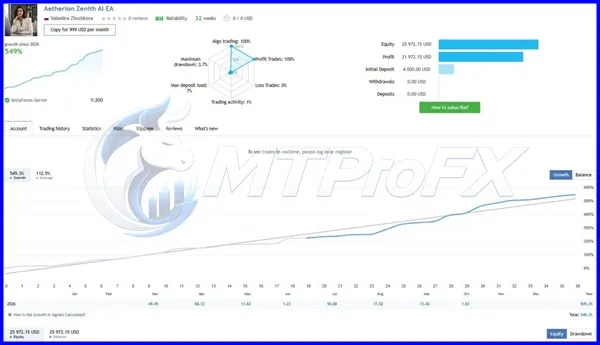
Backtest Results
Get Atherion Zenith AI EA MT5 + MQ5 Source Code FREE (VIP Members Only)
Join a VIP Telegram group to get access. Pick your plan:
Conclusion
☑️ Atherion Zenith AI EA MT5 + MQ5 Source Code is presented as an automated trading package for MetaTrader 5 users interested in algorithmic trading and access to MQ5 source files.
Its suitability depends on the actual trading strategy, supported instruments, configurable risk controls, code quality, and performance under realistic conditions. Review the supplied documentation, test the software thoroughly, and use conservative risk management before considering live deployment.
For traders evaluating automated forex tools, the most important step is to verify functionality and understand potential losses rather than relying on marketing claims or historical returns.
Its suitability depends on the actual trading strategy, supported instruments, configurable risk controls, code quality, and performance under realistic conditions. Review the supplied documentation, test the software thoroughly, and use conservative risk management before considering live deployment.
For traders evaluating automated forex tools, the most important step is to verify functionality and understand potential losses rather than relying on marketing claims or historical returns.
What's Included
File Size
8.47 MB
File Type
ZIP
Downloads
87
Login to add your review.
No reviews yet. Be the first to review this product.
No FAQs available for this product yet.