Back to Products
 0.0 (0 reviews)
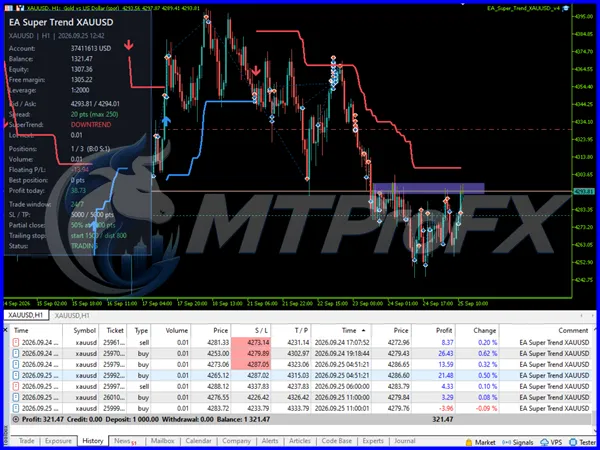
Featured
Bestseller
Expert Advisors
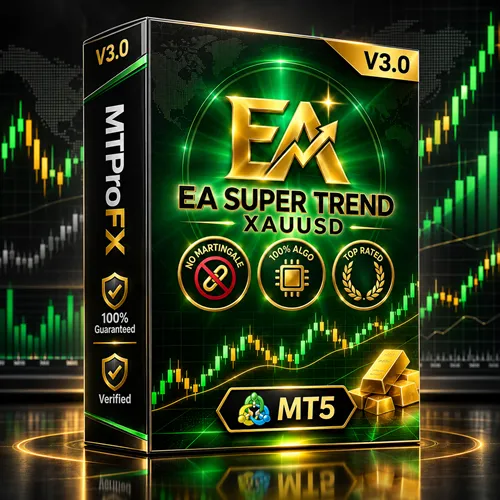
EA Super Trend XAUUSD V3.0 MT5 – Smart Gold Scalping & Risk Control EA
$210.00
$16.99
91.91% OFF☑️ EA Super Trend XAUUSD V3.0 MT5 is an automated gold trading Expert Advisor for MetaTrader 5, featuring Super Trend-based market analysis, customizable trading parameters, and Slippage & Spread Safeguards for more controlled trade execution.
What is EA Super Trend XAUUSD V3.0 MT5?
☑️ EA Super Trend XAUUSD V3.0 MT5 is an automated trading Expert Advisor designed for gold (XAUUSD) trading on the MetaTrader 5 platform. It uses a Super Trend-based trading approach to identify potential market direction and trading opportunities.
The EA is designed to help traders automate their trading activities while providing configurable settings for trade execution and risk management. Its Slippage and Spread Safeguards help manage trading conditions by controlling order execution when spreads or slippage exceed configured limits.
With automated trade management and customizable parameters, EA Super Trend XAUUSD V3.0 MT5 offers a systematic approach to gold trading without requiring traders to monitor every market movement manually.
The EA is designed to help traders automate their trading activities while providing configurable settings for trade execution and risk management. Its Slippage and Spread Safeguards help manage trading conditions by controlling order execution when spreads or slippage exceed configured limits.
With automated trade management and customizable parameters, EA Super Trend XAUUSD V3.0 MT5 offers a systematic approach to gold trading without requiring traders to monitor every market movement manually.
Recommended Trading Currency Pairs
EA Super Trend XAUUSD V3.0 MT5 is primarily designed for gold trading.
☑️ XAUUSD (Gold/USD): Primary recommended trading instrument.
☑️ XAUEUR (Gold/EUR): Optional, subject to broker symbol availability and testing.
☑️ XAUJPY (Gold/JPY): Optional, subject to broker compatibility and strategy testing.
Recommendation: Start with XAUUSD because the EA is specifically designed around gold trading. Test alternative gold symbols before using them on a live account.
☑️ XAUUSD (Gold/USD): Primary recommended trading instrument.
☑️ XAUEUR (Gold/EUR): Optional, subject to broker symbol availability and testing.
☑️ XAUJPY (Gold/JPY): Optional, subject to broker compatibility and strategy testing.
Recommendation: Start with XAUUSD because the EA is specifically designed around gold trading. Test alternative gold symbols before using them on a live account.
EA Super Trend XAUUSD V3.0 MT5 Features
Super Trend-Based Market Analysis - Uses a Super Trend-oriented approach to identify potential market direction and trading opportunities.
Automated Gold Trading - Automates trading operations on XAUUSD, reducing the need for continuous manual chart monitoring.
Slippage Safeguards - Configurable slippage protection helps prevent trades from being executed when price deviations exceed the permitted tolerance.
Spread Safeguards - Spread filtering helps avoid opening trades when broker spreads exceed the configured maximum spread level.
Customizable Trading Parameters - Allows traders to adjust available EA settings according to their trading preferences and account conditions.
MetaTrader 5 Compatibility - Designed to operate within the MT5 trading environment.
Systematic Trade Execution - Follows its programmed trading rules to maintain a consistent approach to market execution.
Reduced Manual Monitoring - Automates trading operations, helping traders spend less time watching charts and managing individual entries manually.
EA Super Trend XAUUSD V3.0 MT5 – Best Settings
The following settings are suggested starting points for testing rather than verified optimal parameters.
Recommended Trading Setup:
☑️ Trading Symbol: XAUUSD
☑️ Platform: MetaTrader 5
☑️ Timeframe: M15 or M30 for initial testing
☑️ Trading Strategy: Super Trend-Based
☑️ Maximum Spread: Configure according to your broker's typical XAUUSD spread
☑️ Maximum Slippage: Start with a moderate tolerance supported by your broker
☑️ Risk Per Trade: 0.5%–1% as a conservative testing guideline
☑️ Lot Size: Start with the minimum supported lot size
☑️ Stop Loss: Use the EA's available stop-loss settings
☑️ Take Profit: Configure according to the strategy and backtesting results
☑️ VPS: Recommended for more consistent operation
Important: Actual performance depends on broker execution, spreads, market volatility, account type and EA configuration. Backtest and forward-test the settings before using real funds.
Recommended Trading Setup:
☑️ Trading Symbol: XAUUSD
☑️ Platform: MetaTrader 5
☑️ Timeframe: M15 or M30 for initial testing
☑️ Trading Strategy: Super Trend-Based
☑️ Maximum Spread: Configure according to your broker's typical XAUUSD spread
☑️ Maximum Slippage: Start with a moderate tolerance supported by your broker
☑️ Risk Per Trade: 0.5%–1% as a conservative testing guideline
☑️ Lot Size: Start with the minimum supported lot size
☑️ Stop Loss: Use the EA's available stop-loss settings
☑️ Take Profit: Configure according to the strategy and backtesting results
☑️ VPS: Recommended for more consistent operation
Important: Actual performance depends on broker execution, spreads, market volatility, account type and EA configuration. Backtest and forward-test the settings before using real funds.
Instructions for Installing EA Super Trend XAUUSD V3.0 MT5
Follow these steps to install EA Super Trend XAUUSD V3.0 MT5:
☑️ Step 1. Download the EA Super Trend XAUUSD V3.0 MT5 file.
☑️ Step 2. Open your MetaTrader 5 trading platform.
☑️ Step 3. Click File → Open Data Folder.
☑️ Step 4. Navigate to MQL5 → Experts.
☑️ Step 5. Copy the downloaded EA file into the Experts folder.
☑️ Step 6. Restart MetaTrader 5 or refresh the Navigator window.
☑️ Step 7. Find EA Super Trend XAUUSD V3.0 under Expert Advisors.
☑️ Step 8. Open an XAUUSD chart and select your preferred timeframe.
☑️ Step 9. Drag the EA onto the chart.
☑️ Step 10. Configure the available trading parameters and enable Algo Trading.
Your EA should now be ready to operate according to its configured settings.
☑️ Step 1. Download the EA Super Trend XAUUSD V3.0 MT5 file.
☑️ Step 2. Open your MetaTrader 5 trading platform.
☑️ Step 3. Click File → Open Data Folder.
☑️ Step 4. Navigate to MQL5 → Experts.
☑️ Step 5. Copy the downloaded EA file into the Experts folder.
☑️ Step 6. Restart MetaTrader 5 or refresh the Navigator window.
☑️ Step 7. Find EA Super Trend XAUUSD V3.0 under Expert Advisors.
☑️ Step 8. Open an XAUUSD chart and select your preferred timeframe.
☑️ Step 9. Drag the EA onto the chart.
☑️ Step 10. Configure the available trading parameters and enable Algo Trading.
Your EA should now be ready to operate according to its configured settings.
Who Should Use EA Super Trend XAUUSD V3.0 MT5?
This Expert Advisor may be suitable for:
☑️ Gold Traders: Traders who primarily focus on XAUUSD.
☑️ MT5 Users: Traders who prefer the MetaTrader 5 environment.
☑️ Automated Trading Enthusiasts: Users interested in rule-based trading automation.
☑️ Busy Traders: People who cannot continuously monitor gold charts.
☑️ Technical Strategy Users: Traders interested in Super Trend-based trading approaches.
☑️ Experienced Traders: Users who understand spread, slippage and automated trading risks.
Beginners should first learn how automated trading works and practice using a demo account.
☑️ Gold Traders: Traders who primarily focus on XAUUSD.
☑️ MT5 Users: Traders who prefer the MetaTrader 5 environment.
☑️ Automated Trading Enthusiasts: Users interested in rule-based trading automation.
☑️ Busy Traders: People who cannot continuously monitor gold charts.
☑️ Technical Strategy Users: Traders interested in Super Trend-based trading approaches.
☑️ Experienced Traders: Users who understand spread, slippage and automated trading risks.
Beginners should first learn how automated trading works and practice using a demo account.
Download EA Super Trend XAUUSD V3.0 MT5
Download EA Super Trend XAUUSD V3.0 MT5Pros and Cons
Pros
Designed specifically for automated gold trading.
Super Trend-based trading approach.
Slippage safeguards for execution control.
Spread filtering functionality.
Customizable trading parameters.
Compatible with MetaTrader 5.
Reduces the need for constant manual monitoring.
Cons
Primarily focused on gold trading.
Performance depends on market conditions.
High gold volatility can increase trading risks.
Broker spreads and execution quality can affect results.
Requires proper configuration and testing.
No guarantee of profits.
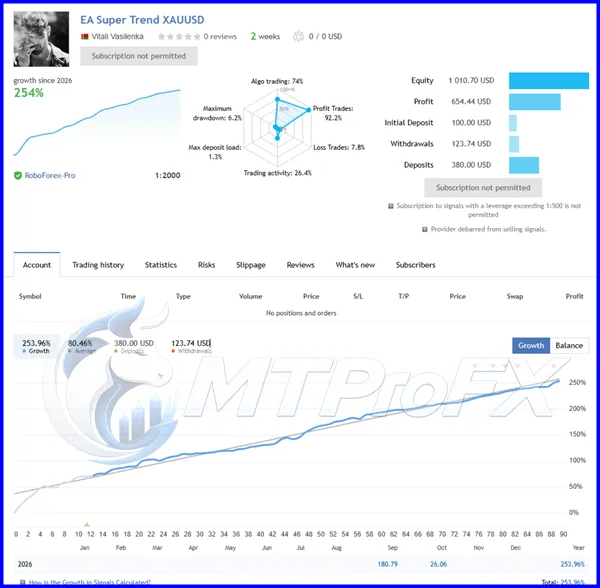
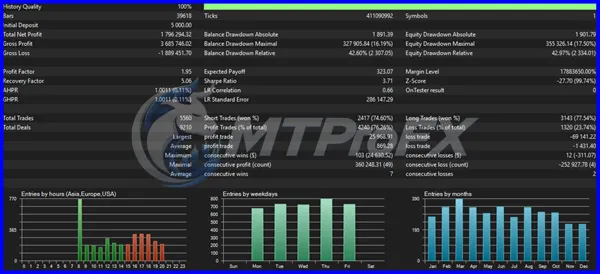
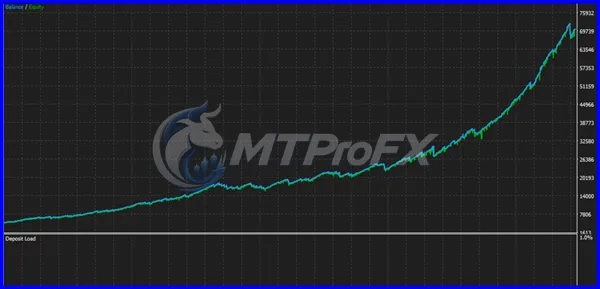
Backtest Results
Get EA Super Trend XAUUSD V3.0 MT5 FREE (VIP Members Only)
Join a VIP Telegram group to get access. Pick your plan:
Conclusion
☑️ EA Super Trend XAUUSD V3.0 MT5 offers an automated approach to trading gold through a Super Trend-based strategy and configurable execution safeguards. Its spread and slippage controls provide additional flexibility when dealing with changing market conditions.
For traders looking to automate their XAUUSD trading activities on MetaTrader 5, this EA is worth exploring. However, proper risk management, broker compatibility checks and strategy testing are essential before deploying it on a live trading account.
For traders looking to automate their XAUUSD trading activities on MetaTrader 5, this EA is worth exploring. However, proper risk management, broker compatibility checks and strategy testing are essential before deploying it on a live trading account.
What's Included
File Size
619 KB
File Type
ZIP
Downloads
124
Login to add your review.
morganarch@gmail.com
Nov 02, 2026
Easy to install and configure on MT5. I like having spread and slippage protection options for gold trading.
It is an automated Forex Expert Advisor designed for gold trading using a Super Trend-based trading approach on MetaTrader 5.
No. This version is designed for MetaTrader 5 (MT5).
XAUUSD (Gold/USD) is the primary recommended trading instrument.
Yes. It includes Slippage & Spread Safeguards to help control trade execution under unfavorable spread and price conditions.
Yes, beginners can explore it, but they should understand basic trading concepts and test the EA on a demo account before live trading.
No. No automated trading system can guarantee profits. Results depend on market conditions, broker execution and risk management.
A VPS is recommended for continuous operation, particularly if you want the EA to remain active without keeping your computer running.
Yes. The available EA parameters can be configured to suit your trading preferences and testing requirements.