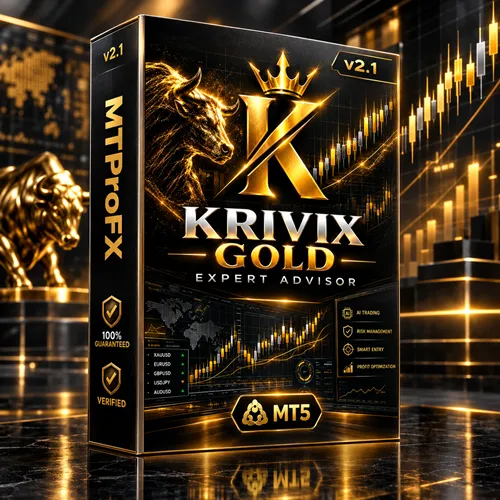
Krivix Gold EA MT5 v2.1 – XAUUSD Gold Trading Robot with Risk Controls
$16.99
93.07% OFF☑️ Krivix Gold EA MT5 v2.1 is an automated Expert Advisor designed specifically for XAUUSD (Gold) trading on MetaTrader 5. It combines three independent trading engines—Alpha, Beta, and Gamma—with automated trade management, configurable position sizing, and risk-control features. Designed for the H1 timeframe, this gold trading robot aims to execute rules-based trading strategies without relying on grid, martingale, or progressive lot-recovery methods.
What is Krivix Gold EA MT5 v2.1?
Recommended Trading Currency Pairs
1. XAUUSD – Gold vs US Dollar
XAUUSD is the primary instrument for this Expert Advisor. Gold can experience significant price movements in response to US economic data, interest-rate expectations, geopolitical developments, and changes in market sentiment.
The EA's multi-engine approach is designed to identify potential trading opportunities through market-structure analysis, Pivot levels, and breakout conditions.
Recommended chart timeframe: H1 (one-hour chart).
Important Trading Considerations
☑️ Confirm that your broker offers XAUUSD under a compatible symbol name.
☑️ Check the broker's minimum lot size, contract specifications, spreads, and execution conditions.
☑️ Be cautious during major economic announcements that can cause sudden gold-price movements.
☑️ Test the EA under realistic trading conditions before considering a live account.
☑️ Do not assume that settings suitable for one broker will produce equivalent results with another.
Although the EA is designed for gold trading, profitability is not guaranteed. Gold's volatility can increase both trading opportunities and potential losses.
Krivix Gold EA MT5 v2.1 Features
Krivix Gold EA MT5 v2.1 – Best Settings
Recommended Starting Configuration
☑️ Trading instrument: XAUUSD (Gold)
☑️ Platform: MetaTrader 5
☑️ Timeframe: H1
☑️ Account type: Hedging account is recommended in the product documentation.
☑️ Position sizing: Begin with a conservative fixed lot size or a low risk-based setting supported by the EA.
☑️ Stop Loss and Take Profit: Review the supplied defaults and confirm that they are appropriate for your broker's gold contract specifications.
☑️ Trading hours: Use any available session controls according to your testing plan.
☑️ News filter: If supported by your version, evaluate the effect of economic-news restrictions on trading activity.
☑️ Maximum exposure: Set conservative limits where the EA provides those options.
☑️ VPS: Consider a reliable VPS if continuous operation is required.
Recommended Account Balance
Some product listings state a minimum deposit of approximately $200, with $500 or more suggested as a starting balance. These figures are vendor recommendations, not guarantees that the account can withstand losses or that a particular lot size is safe. hipips.com
A larger balance does not automatically make a trading system safe. Account size, leverage, lot size, stop distance, and the possibility of consecutive losses must all be considered.
How to Choose the Right Risk Level
1. Begin with a demo account rather than immediately trading real money.
2. Use the smallest practical position size during initial testing.
3. Check the EA's maximum exposure and loss-control settings.
4. Test different market conditions, including volatile gold sessions.
5. Record drawdown, trade frequency, average loss, and average win.
6. Compare the results against your risk limits before considering live trading.
Important: There is no universally best setting for every broker and account. Avoid selecting settings solely because they produced high profits in a short backtest.
Instructions for Installing Krivix Gold EA MT5 v2.1
☑️ Step 1: Install MetaTrader 5
Download and install MetaTrader 5 from your broker or an authorized source.
Open the platform and log in to the trading account you intend to use for testing.
☑️ Step 2: Obtain the EA File
Obtain the EA from the official product source or an authorized seller.
Confirm that the file is intended for MetaTrader 5 and that its version and platform requirements match your terminal.
☑️ Step 3: Open the Data Folder
In MetaTrader 5:
1. Select File from the main menu.
2. Click Open Data Folder.
3. Open the MQL5 folder.
4. Open the Experts folder.
5. Copy the EA file into the appropriate location if your distribution method requires manual installation.
If the product is supplied through the MQL5 Market, follow the platform's installation and activation instructions instead.
☑️ Step 4: Refresh the Expert Advisors List
Open the Navigator panel in MetaTrader 5.
Right-click Expert Advisors and select Refresh, or restart the platform if necessary.
Confirm that the EA appears in the list.
☑️ Step 5: Open the Gold Chart
Open the XAUUSD chart provided by your broker.
Select the H1 timeframe, which is the recommended timeframe for Krivix Gold.
Check whether your broker uses a modified symbol name, such as a gold symbol with a suffix.
☑️ Step 6: Attach the EA to the Chart
Drag Krivix Gold onto the XAUUSD H1 chart.
Review the available input parameters carefully. Configure position sizing, risk limits, and other options only after understanding their purpose.
☑️ Step 7: Enable Automated Trading
Enable the platform's Algo Trading function and check that automated trading is permitted in the EA's settings.
Do not enable DLL imports unless the exact authorized version explicitly requires them. Some product listings identify Krivix Gold as a NoDLL EA, but verify this against your supplied file and instructions. fxproea.com
☑️ Step 8: Test Before Live Trading
Run a historical backtest using realistic spread, commission, and execution assumptions where available.
Then test the EA on a demo account. Check the Experts and Journal logs for errors, rejected orders, and other operational problems.
Only consider live trading after you have evaluated the system's behavior and determined that its risks are acceptable.
Who Should Use Krivix Gold EA MT5 v2.1?
1. Gold Traders
Traders who primarily focus on XAUUSD may appreciate having a tool designed around gold-market analysis rather than assuming that a general-purpose forex EA will suit their preferred instrument.
2. Traders Interested in Multi-Strategy Systems
The Alpha, Beta, and Gamma engines provide separate trading approaches within one EA. This may appeal to users who want to evaluate different strategies independently.
3. Traders Who Prefer Rules-Based Execution
An automated system can execute its programmed rules without requiring the user to manually place every trade.
However, automation does not eliminate emotional decision-making entirely. Users still need to choose settings, monitor risk, and decide when to stop the system.
4. Experienced MT5 Users
Traders familiar with Expert Advisors, backtesting, order execution, and account-level risk management may find it easier to assess the EA's behavior.
5. Traders Who Can Monitor Automated Systems
Users who can review trading results, check terminal logs, monitor exposure, and respond to technical problems are better positioned to evaluate an automated trading tool responsibly.
Who Should Avoid Using It Without Further Preparation?
Beginners who do not understand gold volatility, leverage, lot sizing, or drawdown should avoid immediately deploying the EA on a live account.
It is also unsuitable for anyone expecting guaranteed profits, risk-free trading, or an automated income source requiring no monitoring.
Download Krivix Gold EA MT5 v2.1
Download Krivix Gold EA MT5 v2.1Pros and Cons
Pros
Cons
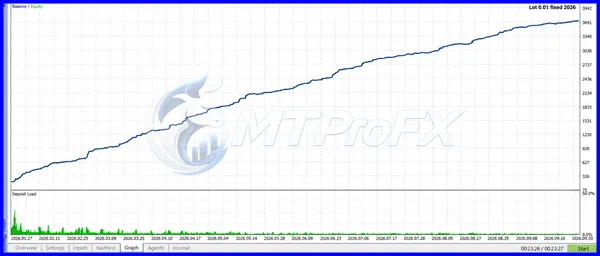
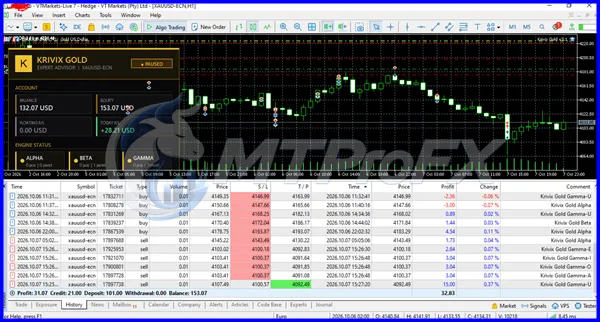
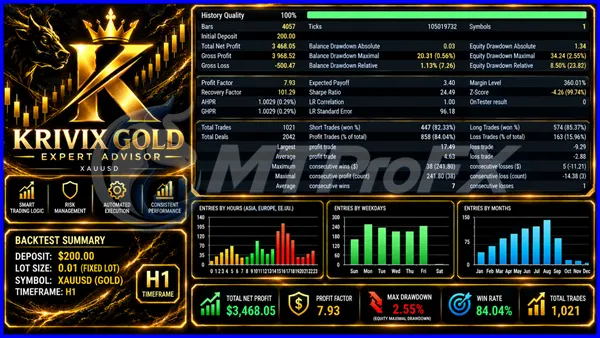
Backtest Results
Get Krivix Gold EA MT5 v2.1 FREE (VIP Members Only)
Join a VIP Telegram group to get access. Pick your plan:
Conclusion
Its main advertised strengths include three independent trading engines, automated position management, configurable lot sizing, and a design that avoids martingale and grid recovery methods.
The most important step is to evaluate its actual performance rather than relying on marketing claims. Start with conservative settings, test on a demo account, account for trading costs, and monitor drawdown before considering live deployment.
Krivix Gold EA MT5 v2.1 may be worth evaluating for experienced gold traders who understand automated trading risks. Its features alone do not establish profitability, and no trading outcome is guaranteed.
Risk disclaimer: Trading gold, forex, and leveraged financial products involves substantial risk. You may lose some or all of your trading capital. Past performance and simulated results do not guarantee future returns. This article is for informational purposes only and is not financial advice.
What's Included
Login to add your review.
I'm interested in the EA's multi-engine approach and its focus on gold trading. The separate strategy settings are useful for evaluating different configurations. I'm testing it on a demo account before considering live use.