Back to Products
 0.0 (0 reviews)
Featured
Bestseller
Expert Advisors
Lizard EA MT5 v2.1 MQ5 Source Code + SetFiles | Smart Forex Trading Tool
$186.00
$29.99
83.88% OFF☑️ Lizard EA MT5 v2.1 MQ5 Source Code + SetFiles is an automated Forex trading tool package for MetaTrader 5. It includes source code for inspection and customization, along with configuration files for convenient EA setup. Traders can evaluate the software using MT5 backtesting and demo trading while reviewing spread, slippage, and risk management settings. Suitable for Forex traders interested in automated strategy testing and algorithmic trading.
What is Lizard EA MT5 v2.1?
☑️ Lizard EA MT5 v2.1 MQ5 Source Code + SetFiles is an automated Forex trading tool package for MetaTrader 5. It includes source code for inspection and customization, along with configuration files for convenient EA setup. Traders can evaluate the software using MT5 backtesting and demo trading while reviewing spread, slippage, and risk management settings. Suitable for Forex traders interested in automated strategy testing and algorithmic trading.
Recommended Trading Currency Pairs
Lizard EA MT5 v2.1 is a MetaTrader 5 Expert Advisor package designed for automated Forex trading. The recommended currency pairs depend on the EA's underlying strategy, spread requirements, and market conditions.
The following currency pairs are suitable candidates for initial testing:
☑️ EURUSD: A widely traded major pair with generally competitive spreads and high liquidity.
☑️ GBPUSD: Offers greater price movement than EURUSD and may require careful spread and volatility monitoring.
☑️ USDJPY: A liquid major pair suitable for testing automated strategies during active market sessions.
☑️ AUDUSD: A major pair that can be evaluated under different market volatility conditions.
☑️ USDCAD: Provides another liquid market for evaluating the EA's performance across different trading sessions.
Recommended starting point: Begin with EURUSD on a demo account. Evaluate other pairs individually rather than running the EA across multiple instruments immediately.
Actual pair compatibility should be confirmed using the supplied MQ5 source code and SetFiles.
Lizard EA MT5 v2.1 Features
Slippage & Spread Safeguards - Lizard EA MT5 v2.1 MQ5 Source Code + SetFiles provides a package intended for traders who want to configure and test automated trading strategies within MetaTrader 5.
Spread Protection - Spread protection helps prevent trading when the difference between the bid and ask price becomes excessively wide.
Slippage Protection - Slippage occurs when an order is executed at a different price from the requested price.
MQ5 Source Code Access - The MQ5 source code provides access to the EA's programming logic, allowing experienced users to inspect, compile, and customize the software.
SetFiles Support - SetFiles contain saved EA input parameters that can be loaded into MetaTrader 5.
Lizard EA MT5 v2.1 – Best Settings
The best settings for Lizard EA MT5 v2.1 depend on the broker's execution conditions and the EA's actual strategy.
There is no universally profitable configuration. The following recommendations provide a starting point for controlled testing.
Recommended Initial Configuration
☑️ Trading Platform: MetaTrader 5.
☑️ Trading Pair: EURUSD.
☑️ Timeframe: Begin by testing the timeframe specified in the supplied SetFile.
☑️ Starting Lot: Use the minimum supported lot size.
☑️ Maximum Spread: Use a conservative limit appropriate for the selected broker.
☑️ Slippage: Configure an acceptable execution deviation based on broker conditions.
☑️ Risk Management: Use conservative risk settings and avoid increasing exposure after losses.
☑️ Trading Sessions: Test the EA during liquid market hours.
☑️ News Trading: Avoid high-impact news periods until the EA's behavior has been evaluated.
How to Choose a SetFile
If multiple SetFiles are included, test each configuration separately.
Compare the following performance metrics:
☑️ Total trades.
☑️ Maximum drawdown.
☑️ Profit factor.
☑️ Average trade result.
☑️ Spread sensitivity.
☑️ Execution quality.
A configuration that performs well in one market environment may perform differently in another.
Important: The exact input values should be taken from the original Lizard EA MT5 v2.1 package. Do not assume that settings from an older version will work correctly with v2.1.
Instructions for Installing Lizard EA MT5 v2.1
Follow these steps to install Lizard EA MT5 v2.1 MQ5 Source Code + SetFiles on MetaTrader 5.
☑️ Step 1: Download the Files
Download the Lizard EA MT5 v2.1 package and extract the ZIP archive if necessary.
Locate the following files:
- Lizard EA MQ5 source file.
- Compiled EX5 file, if included.
- SetFiles configuration files.
- Installation instructions, if provided.
☑️ Step 2: Open MetaTrader 5
Launch your MetaTrader 5 trading platform.
Navigate to:
File → Open Data Folder
This opens the directory containing your MetaTrader 5 terminal files.
☑️ Step 3: Install the EA
Open the following folder:
MQL5 → Experts
Copy the Lizard EA MQ5 or EX5 file into this directory.
If only the MQ5 source code is provided, open it using MetaEditor and compile it.
A successful compilation should generate an EX5 file.
☑️ Step 4: Install the SetFiles
Save the supplied SetFiles in a convenient folder.
If the EA uses standard MetaTrader 5 presets, they can generally be loaded through the EA's Inputs tab using the Load option.
The precise location and format depend on how the EA is programmed.
☑️ Step 5: Attach the EA to a Chart
1. Return to MetaTrader 5.
2. Open the recommended currency pair.
3. Select the recommended timeframe.
4. Open the Navigator panel.
5. Locate Lizard EA MT5 v2.1.
6. Drag the EA onto the chart.
7. Load the appropriate SetFile.
8. Review the EA's input settings.
9. Enable algorithmic trading if required.
☑️ Step 6: Test the EA
Before using a live trading account, run a backtest using the MetaTrader 5 Strategy Tester.
Check the Journal and Experts tabs for errors.
Then test the EA on a demo account to evaluate its behavior under real market conditions.
Who Should Use Lizard EA MT5 v2.1?
Lizard EA MT5 v2.1 may be suitable for:
☑️ Forex beginners: Traders who want to learn how Expert Advisors operate within MetaTrader 5.
☑️ Automated trading enthusiasts: Users interested in evaluating algorithmic trading strategies.
☑️ MQ5 developers: Programmers who want to inspect or customize the EA's source code.
☑️ Strategy testers: Traders who want to evaluate different SetFiles, currency pairs, and execution conditions.
☑️ Experienced Forex traders: Users who understand automated trading risks and can monitor their trading systems.
The EA is not suitable for anyone expecting guaranteed profits or completely risk-free automated trading.
Download Lizard EA MT5 v2.1
Download Lizard EA MT5 v2.1Pros and Cons
Pros
Designed for MetaTrader 5.
MQ5 source code included in the advertised package.
SetFiles support for convenient configuration.
Can be evaluated using the MT5 Strategy Tester.
Can be evaluated using the MT5 Strategy Tester.
Potential customization opportunities for experienced developers.
Slippage and spread settings can be reviewed for execution management.
Suitable for demo testing and strategy evaluation.
Cons
Actual trading performance depends on market conditions.
Broker spreads and execution quality can affect results.
MQ5 source code may require programming knowledge.
SetFiles may need adjustments for different brokers.
Backtest results do not guarantee future performance.
The exact strategy and risk profile should be verified before deployment.
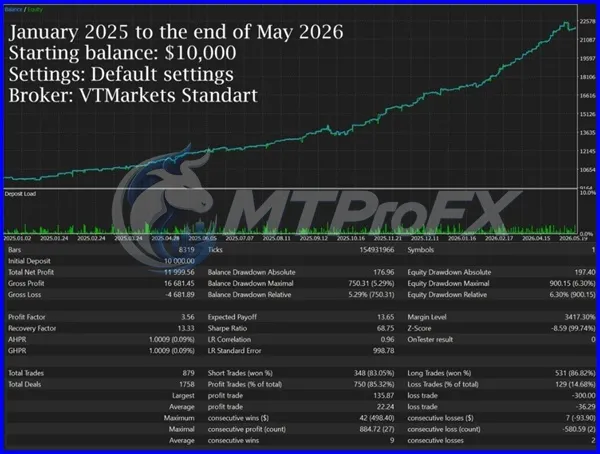
Backtest Results
Conclusion
☑️ Lizard EA MT5 v2.1 MQ5 Source Code + SetFiles offers a convenient starting point for traders exploring automated Forex trading on MetaTrader 5.
The combination of MQ5 source code and SetFiles can make it easier to review, configure, and test an Expert Advisor.
However, successful automated trading requires more than simply installing an EA. Traders should evaluate execution quality, spread conditions, drawdown, and risk management before considering live deployment.
For a more reliable evaluation, begin with EURUSD on a demo account, test the supplied configurations, and monitor the EA under different market conditions.
Always remember: Forex trading involves financial risk. Past performance and backtesting results do not guarantee future profits.
What's Included
File Size
193 KB
File Type
ZIP
Downloads
113
Login to add your review.
kuranabath@gmail.com
Nov 05, 2026
The MQ5 source code is a useful addition. I like being able to inspect the EA and test different configurations in MetaTrader 5.
Lizard EA MT5 v2.1 is an Expert Advisor package designed for automated Forex trading through the MetaTrader 5 platform. The advertised package includes MQ5 source code and SetFiles.
The product package is described as including MQ5 source code. Buyers should verify that the downloadable archive contains the original MQ5 file.
SetFiles are saved input configurations used to load predefined EA parameters. They can simplify the setup process and help traders compare different configurations.
EURUSD, GBPUSD, USDJPY, AUDUSD, and USDCAD are possible pairs for initial evaluation. Actual compatibility depends on the EA's trading logic and broker conditions.
Spread protection depends on the EA's actual implementation. Users should inspect the input parameters and MQ5 source code to verify whether a maximum spread filter is available.
The EA can be considered for live deployment only after thorough testing and verification of its risk management and execution behavior. Demo testing is recommended first.
Beginners can use the EA to learn automated trading. However, understanding MetaTrader 5, EA settings, and Forex trading risks is important.
If the package includes editable MQ5 source code and the applicable license permits modifications, experienced MQL5 developers can inspect and customize the EA.
No. No Expert Advisor can guarantee profits. Trading results depend on market conditions, execution quality, and risk management.