Back to Products
 0.0 (0 reviews)
Featured
Expert Advisors
MFXT PHANTOM X EA MT5 V2.0
$799.00
$14.99
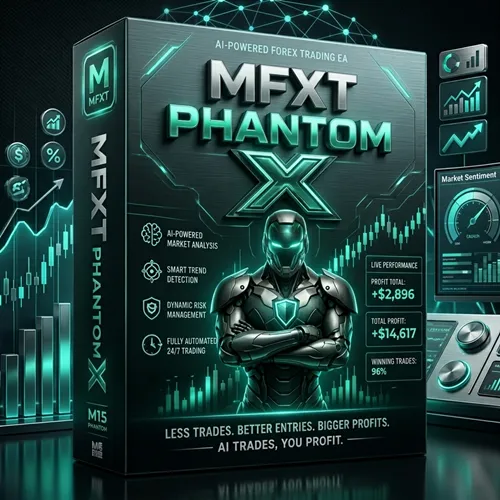
98.12% OFFMFXT PHANTOM X EA MT5 V2.0 is a fully automated Expert Advisor designed for the MetaTrader 5 platform. It utilizes advanced market analysis algorithms to identify potential trading opportunities and execute trades automatically. The EA aims to reduce emotional decision-making while maintaining disciplined risk management and efficient trade execution. Whether you are a beginner seeking automation or an experienced trader looking to diversify your trading strategies, MFXT PHANTOM X EA MT5 V2.0 offers a practical solution for hands-free Forex trading.
What you get
- Advanced Automated Trading - The EA continuously scans the market and executes trades automatically based on predefined trading logic.
- Intelligent Market Analysis - Utilizes technical indicators and price action analysis to identify favorable market conditions.
- Built-In Risk Management - Includes stop loss and take-profit mechanisms designed to help control trading risks.
- MT5 Optimized - Developed specifically for MetaTrader 5, ensuring fast execution and compatibility with modern brokerage environments.
- Multi-Currency Support - Capable of monitoring and trading multiple currency pairs simultaneously.
7-day refund support for valid technical issues.
Need help? Contact support via Telegram for setup help.
What is MFXT PHANTOM X EA MT5 V2.0?
MFXT PHANTOM X EA MT5 V2.0 is a fully automated Expert Advisor designed for the MetaTrader 5 platform. It utilizes advanced market analysis algorithms to identify potential trading opportunities and execute trades automatically. The EA aims to reduce emotional decision-making while maintaining disciplined risk management and efficient trade execution.
Whether you are a beginner seeking automation or an experienced trader looking to diversify your trading strategies, MFXT PHANTOM X EA MT5 V2.0 offers a practical solution for hands-free Forex trading.
Whether you are a beginner seeking automation or an experienced trader looking to diversify your trading strategies, MFXT PHANTOM X EA MT5 V2.0 offers a practical solution for hands-free Forex trading.
Recommended Trading Currency Pairs
For optimal performance, the EA is commonly used on the following Forex pairs:
✅ EUR/USD
✅ GBP/USD
✅ USD/JPY
✅ AUD/USD
✅ USD/CAD
✅ EUR/GBP
✅ GBP/JPY
✅ EUR/JPY
These pairs generally provide sufficient liquidity and stable spreads, which are important for automated trading systems.
✅ EUR/USD
✅ GBP/USD
✅ USD/JPY
✅ AUD/USD
✅ USD/CAD
✅ EUR/GBP
✅ GBP/JPY
✅ EUR/JPY
These pairs generally provide sufficient liquidity and stable spreads, which are important for automated trading systems.
MFXT PHANTOM X EA MT5 V2.0 Features
Advanced Automated Trading - The EA continuously scans the market and executes trades automatically based on predefined trading logic.
Intelligent Market Analysis - Utilizes technical indicators and price action analysis to identify favorable market conditions.
Built-In Risk Management - Includes stop loss and take-profit mechanisms designed to help control trading risks.
MT5 Optimized - Developed specifically for MetaTrader 5, ensuring fast execution and compatibility with modern brokerage environments.
Multi-Currency Support - Capable of monitoring and trading multiple currency pairs simultaneously.
Low Emotional Impact - Eliminates emotional trading decisions by following programmed rules consistently.
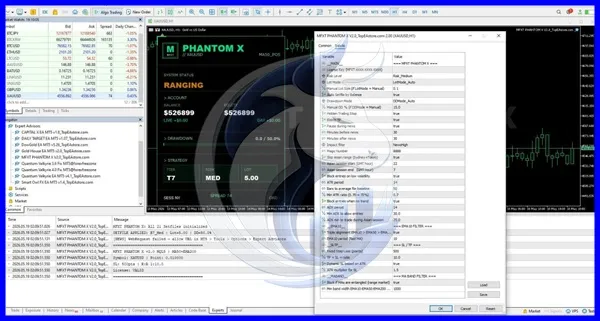
Flexible Trading Parameters - Users can customize lot sizes, risk percentages, trading hours, and other important settings.
Fully Automated Operation - Runs continuously once installed, requiring minimal manual intervention.
MFXT PHANTOM X EA MT5 V2.0 – Best Settings
The following settings are commonly recommended for balanced performance:
✅ Account Type: ECN or Raw Spread Account
✅ Minimum Deposit: $200–$500
✅ Timeframe: M15 or H1
✅ Risk Per Trade: 1%–2%
✅ Auto Trading: Enabled
✅ Spread Filter: Enabled
✅ VPS Hosting: Recommended for 24/7 operation
✅ Maximum Simultaneous Trades: Based on account size and risk tolerance
✅ News Filter: Enabled if available
Always test settings on a demo account before using them on a live trading account.
✅ Account Type: ECN or Raw Spread Account
✅ Minimum Deposit: $200–$500
✅ Timeframe: M15 or H1
✅ Risk Per Trade: 1%–2%
✅ Auto Trading: Enabled
✅ Spread Filter: Enabled
✅ VPS Hosting: Recommended for 24/7 operation
✅ Maximum Simultaneous Trades: Based on account size and risk tolerance
✅ News Filter: Enabled if available
Always test settings on a demo account before using them on a live trading account.
Instructions for Installing MFXT PHANTOM X EA MT5 V2.0
✅ Step 1
Download the MFXT PHANTOM X EA MT5 V2.0 package.
✅ Step 2
Open MetaTrader 5.
✅ Step 3
Navigate to:
File → Open Data Folder
✅ Step 4
Copy the EA file into:
MQL5 → Experts
✅ Step 5
Restart MetaTrader 5 or refresh the Navigator window.
✅ Step 6
Drag the EA onto the desired chart.
✅ Step 7
Enable:
Auto Trading
Allow Algo Trading
DLL Imports (if required)
✅ Step 8
Configure your preferred settings and start automated trading.
Download the MFXT PHANTOM X EA MT5 V2.0 package.
✅ Step 2
Open MetaTrader 5.
✅ Step 3
Navigate to:
File → Open Data Folder
✅ Step 4
Copy the EA file into:
MQL5 → Experts
✅ Step 5
Restart MetaTrader 5 or refresh the Navigator window.
✅ Step 6
Drag the EA onto the desired chart.
✅ Step 7
Enable:
Auto Trading
Allow Algo Trading
DLL Imports (if required)
✅ Step 8
Configure your preferred settings and start automated trading.
Who Should Use MFXT PHANTOM X EA MT5 V2.0?
MFXT PHANTOM X EA MT5 V2.0 may be suitable for:
✅ Beginner Traders
Those who want automated market participation without manually analyzing charts.
✅ Busy Professionals
Individuals who do not have time to monitor the market throughout the day.
✅ Algorithmic Traders
Users interested in automated execution and systematic trading approaches.
✅ Portfolio Diversification Traders
Investors looking to add automated Forex strategies to their trading portfolio.
✅ VPS Users
Traders seeking uninterrupted 24/7 automated trading.
✅ Beginner Traders
Those who want automated market participation without manually analyzing charts.
✅ Busy Professionals
Individuals who do not have time to monitor the market throughout the day.
✅ Algorithmic Traders
Users interested in automated execution and systematic trading approaches.
✅ Portfolio Diversification Traders
Investors looking to add automated Forex strategies to their trading portfolio.
✅ VPS Users
Traders seeking uninterrupted 24/7 automated trading.
Download MFXT PHANTOM X EA MT5 V2.0
Download MFXT PHANTOM X EA MT5 V2.0Pros and Cons
Pros
Fully automated trading system
MT5 platform compatibility
Supports multiple currency pairs
Built-in risk management features
Reduces emotional trading
Easy installation process
Suitable for beginners and advanced traders
Customizable trading parameters
Cons
Trading results depend on market conditions
Requires VPS for optimal uninterrupted performance
Not guaranteed to generate profits
Broker spreads and execution quality can affect results
Requires proper risk management settings
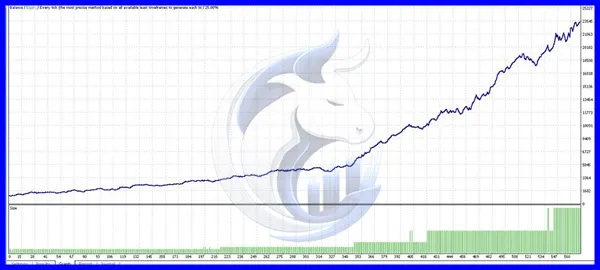
Backtest Results
Conclusion
MFXT PHANTOM X EA MT5 V2.0 offers an automated Forex trading solution for MetaTrader 5 users seeking efficiency and consistency. With support for multiple currency pairs, customizable risk settings, and advanced market analysis features, it can serve as a valuable tool for traders interested in algorithmic trading.
As with any trading software, users should conduct thorough testing on demo accounts and implement responsible risk management before transitioning to live trading.
As with any trading software, users should conduct thorough testing on demo accounts and implement responsible risk management before transitioning to live trading.
What's Included
File Size
2.27MB
File Type
ZIP
Downloads
41
Login to add your review.
sarahw8@gmail.com
Jun 02, 2026
Very easy to install and configure. The EA runs smoothly on my VPS and has helped automate my trading routine.
It is an automated Forex trading Expert Advisor designed for the MetaTrader 5 platform.
Yes. Once installed and configured, it can analyze the market and execute trades automatically.
ECN and low-spread brokers are generally preferred for automated trading systems.
Most traders start with $200 to $500, although requirements may vary depending on risk settings.
Yes. The installation process is straightforward, and the EA is suitable for both beginners and experienced traders.
Yes. It can be used on several major Forex pairs.
While not mandatory, a VPS is highly recommended for uninterrupted 24/7 operation.
No. All Forex trading involves risk, and no trading system can guarantee profits.
M15 and H1 are commonly used, depending on the strategy configuration.
No. MFXT PHANTOM X EA MT5 V2.0 is designed specifically for MetaTrader 5.