Back to Products
 0.0 (0 reviews)
Featured
Bestseller
Expert Advisors
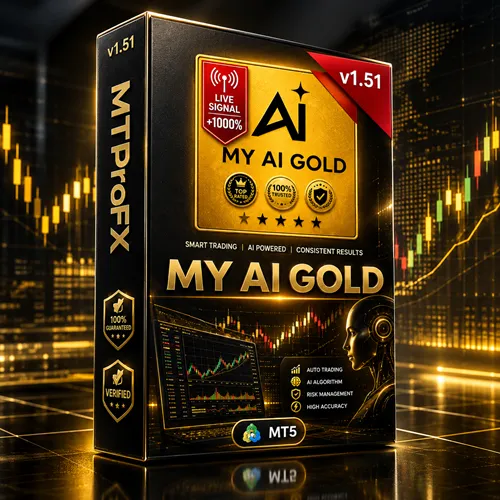
My AI Gold EA MT5 v1.51 – Smart XAUUSD Trading Robot for MetaTrader 5
$260.00
$16.99
93.47% OFF☑️ My AI Gold EA MT5 v1.51 is an automated trading tool intended for MetaTrader 5 users interested in gold trading. Explore its compatibility, configurable parameters, and potential trading workflow through backtesting and demo testing before considering live use. Always verify the official specifications and apply appropriate risk management.
What is My AI Gold EA MT5 v1.51?
☑️ My AI Gold EA MT5 v1.51 is a MetaTrader 5 Expert Advisor designed for traders interested in automating their gold trading activities. It is intended for use with compatible MT5 trading accounts and may help reduce the need to monitor every market movement manually.
Gold, commonly traded as XAUUSD, can experience rapid price changes in response to economic announcements, interest-rate decisions, market sentiment, and changes in the US dollar. An automated trading tool can execute its programmed trading rules without requiring the trader to manually place every order.
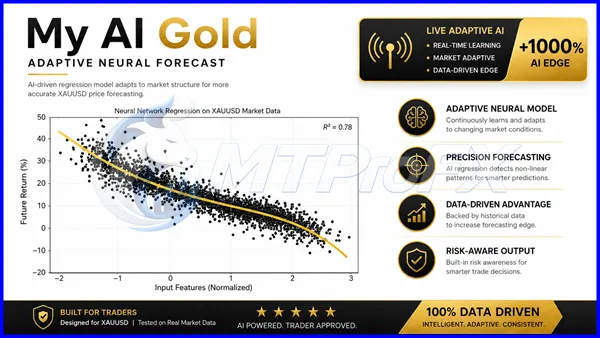
The exact strategy, AI functionality, supported trading symbols, and risk-management features of version 1.51 should be verified against the official product documentation. The name alone does not establish that the EA uses machine learning or artificial intelligence.
Gold, commonly traded as XAUUSD, can experience rapid price changes in response to economic announcements, interest-rate decisions, market sentiment, and changes in the US dollar. An automated trading tool can execute its programmed trading rules without requiring the trader to manually place every order.
The exact strategy, AI functionality, supported trading symbols, and risk-management features of version 1.51 should be verified against the official product documentation. The name alone does not establish that the EA uses machine learning or artificial intelligence.
Recommended Trading Currency Pairs
My AI Gold EA MT5 v1.51 is positioned as a gold-focused trading tool. Confirm the supported symbols and broker compatibility before using it.
☑️ XAUUSD: Gold against the US dollar; the primary symbol to investigate for this EA.
☑️ XAUUSD variations: Some brokers use symbol suffixes or prefixes, such as XAUUSD.a or GOLD. Compatibility must be confirmed.
☑️ Other gold symbols: Availability depends on the broker and the EA's programmed symbol requirements.
Recommended starting point: Test XAUUSD on a demo account first. Do not assume that the EA supports EURUSD, GBPUSD, or other currency pairs without documentation confirming compatibility.
Recommended Timeframe
The optimal timeframe for My AI Gold EA MT5 v1.51 has not been independently verified. Check the developer's instructions and backtest the EA on the intended timeframe before using real funds.
☑️ XAUUSD: Gold against the US dollar; the primary symbol to investigate for this EA.
☑️ XAUUSD variations: Some brokers use symbol suffixes or prefixes, such as XAUUSD.a or GOLD. Compatibility must be confirmed.
☑️ Other gold symbols: Availability depends on the broker and the EA's programmed symbol requirements.
Recommended starting point: Test XAUUSD on a demo account first. Do not assume that the EA supports EURUSD, GBPUSD, or other currency pairs without documentation confirming compatibility.
Recommended Timeframe
The optimal timeframe for My AI Gold EA MT5 v1.51 has not been independently verified. Check the developer's instructions and backtest the EA on the intended timeframe before using real funds.
My AI Gold EA MT5 v1.51 Features
Automated trading: Designed to automate trading decisions according to its programmed rules.
MetaTrader 5 compatibility: Intended for the MT5 trading platform.
Gold trading focus: Suitable for investigating automated strategies involving XAUUSD, subject to symbol compatibility.
Reduced manual monitoring: Automation may reduce the need to place every trade manually.
Configurable parameters: Available settings depend on the EA's actual input parameters.
Strategy testing: MT5 Strategy Tester can be used to evaluate compatible EAs using historical data.
Risk-management evaluation: Traders should check whether the EA includes stop-loss, position-sizing, and other protective controls.
My AI Gold EA MT5 v1.51 – Best Settings
There is no universally optimal configuration without verified documentation and reliable backtesting results. Use the following as a cautious testing approach rather than official preset values.
1. Trading symbol: Start with the exact XAUUSD symbol supported by your broker.
2. Timeframe: Use the timeframe specified by the developer. If it is unknown, compare reasonable timeframe candidates in MT5 Strategy Tester.
3. Lot size: Start with a small simulated position size during demo testing. Ensure that any eventual live position size is appropriate for your account and potential losses.
4. Stop-loss and take-profit: If the EA offers these settings, evaluate them using historical testing. Do not assume that protective orders are enabled by default.
5. Maximum risk: Establish a conservative risk limit before testing. Avoid increasing lot sizes to recover previous losses.
6. Spread and slippage: Test under realistic trading costs. Gold spreads can widen during volatile periods and around major economic announcements.
7. Trading hours: Follow verified developer recommendations, if available. Compare results across market sessions instead of assuming a particular session is always best.
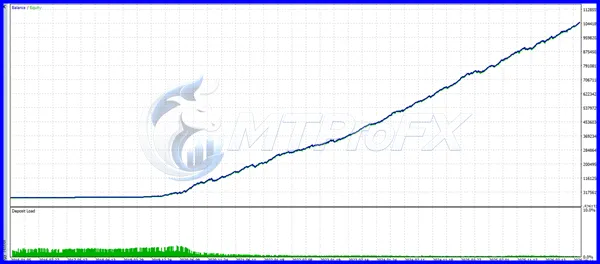
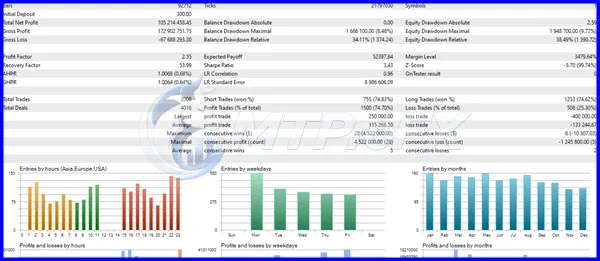
8. Backtesting: Test different market conditions, including trending, sideways, and volatile periods. Review drawdown, trade frequency, profit factor, and transaction costs.
9. Demo forward testing: Run the EA on a demo account after historical testing to evaluate its behavior under current market conditions.
Important: Do not use unverified preset files or aggressive recovery settings on a live account.
1. Trading symbol: Start with the exact XAUUSD symbol supported by your broker.
2. Timeframe: Use the timeframe specified by the developer. If it is unknown, compare reasonable timeframe candidates in MT5 Strategy Tester.
3. Lot size: Start with a small simulated position size during demo testing. Ensure that any eventual live position size is appropriate for your account and potential losses.
4. Stop-loss and take-profit: If the EA offers these settings, evaluate them using historical testing. Do not assume that protective orders are enabled by default.
5. Maximum risk: Establish a conservative risk limit before testing. Avoid increasing lot sizes to recover previous losses.
6. Spread and slippage: Test under realistic trading costs. Gold spreads can widen during volatile periods and around major economic announcements.
7. Trading hours: Follow verified developer recommendations, if available. Compare results across market sessions instead of assuming a particular session is always best.
8. Backtesting: Test different market conditions, including trending, sideways, and volatile periods. Review drawdown, trade frequency, profit factor, and transaction costs.
9. Demo forward testing: Run the EA on a demo account after historical testing to evaluate its behavior under current market conditions.
Important: Do not use unverified preset files or aggressive recovery settings on a live account.
Instructions for Installing My AI Gold EA MT5 v1.51
Follow these general steps to install a compatible Expert Advisor in MetaTrader 5.
Step 1. Download the EA: Obtain the legitimate My AI Gold EA MT5 v1.51 file from your authorized provider.
Step 2. Open MetaTrader 5: Launch the trading platform on your computer.
Step 3. Open the data folder: Click File → Open Data Folder.
Step 4. Locate the Experts folder: Navigate to MQL5 → Experts.
Step 5. Copy the EA file: Place the supplied .ex5 file in the appropriate Experts folder. If source code is supplied instead, follow the developer's compilation instructions.
Step 6. Refresh the Navigator: Return to MT5, open Navigator, right-click Expert Advisors, and select Refresh. Restart MT5 if necessary.
Step 7. Open a chart: Select the broker-supported gold symbol, such as XAUUSD, if compatible.
Step 8. Attach the EA: Drag the EA onto the chart and review its available input settings.
Step 9. Enable automated trading: Allow algorithmic trading only after reviewing the EA's permissions and behavior.
Step 10. Test before live trading: Run a backtest and then use a demo account to verify order execution, position sizing, and risk controls.
Menu names can vary slightly between MT5 versions. Never enable DLL imports or other external permissions unless the official documentation explains why they are required.
Step 1. Download the EA: Obtain the legitimate My AI Gold EA MT5 v1.51 file from your authorized provider.
Step 2. Open MetaTrader 5: Launch the trading platform on your computer.
Step 3. Open the data folder: Click File → Open Data Folder.
Step 4. Locate the Experts folder: Navigate to MQL5 → Experts.
Step 5. Copy the EA file: Place the supplied .ex5 file in the appropriate Experts folder. If source code is supplied instead, follow the developer's compilation instructions.
Step 6. Refresh the Navigator: Return to MT5, open Navigator, right-click Expert Advisors, and select Refresh. Restart MT5 if necessary.
Step 7. Open a chart: Select the broker-supported gold symbol, such as XAUUSD, if compatible.
Step 8. Attach the EA: Drag the EA onto the chart and review its available input settings.
Step 9. Enable automated trading: Allow algorithmic trading only after reviewing the EA's permissions and behavior.
Step 10. Test before live trading: Run a backtest and then use a demo account to verify order execution, position sizing, and risk controls.
Menu names can vary slightly between MT5 versions. Never enable DLL imports or other external permissions unless the official documentation explains why they are required.
Who Should Use My AI Gold EA MT5 v1.51?
This EA may be worth evaluating for:
☑️ Gold traders: People interested in automated XAUUSD strategies.
☑️ MetaTrader 5 users: Traders who already use a compatible MT5 broker.
☑️ Algorithmic trading learners: Users who want to understand EA testing and automated execution.
☑️ Strategy testers: Traders comfortable reviewing backtests and demo performance.
☑️ Time-conscious traders: People interested in reducing manual order placement, while still monitoring risk.
It may not be suitable for people expecting guaranteed profits, users who cannot tolerate trading losses, or beginners who plan to run an unfamiliar EA on a live account without testing.
☑️ Gold traders: People interested in automated XAUUSD strategies.
☑️ MetaTrader 5 users: Traders who already use a compatible MT5 broker.
☑️ Algorithmic trading learners: Users who want to understand EA testing and automated execution.
☑️ Strategy testers: Traders comfortable reviewing backtests and demo performance.
☑️ Time-conscious traders: People interested in reducing manual order placement, while still monitoring risk.
It may not be suitable for people expecting guaranteed profits, users who cannot tolerate trading losses, or beginners who plan to run an unfamiliar EA on a live account without testing.
Download My AI Gold EA MT5 v1.51
Download My AI Gold EA MT5 v1.51Pros and Cons
Pros
Designed for automated trading through MetaTrader 5.
May reduce the need for manual trade entry.
Can be evaluated with historical data using MT5 Strategy Tester.
Potentially useful for traders researching automated gold strategies.
Demo testing allows users to investigate its behavior before committing real funds.
Cons
The exact strategy and version-specific features have not been verified.
Profitability is not guaranteed.
Gold can experience sharp price movements and sudden spread increases.
Results may differ between brokers because of execution conditions and symbol specifications.
Poorly selected settings can increase drawdown and potential losses.
Historical performance may not reflect future market behavior.
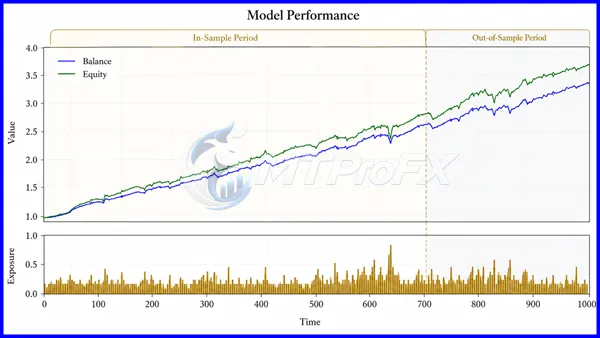
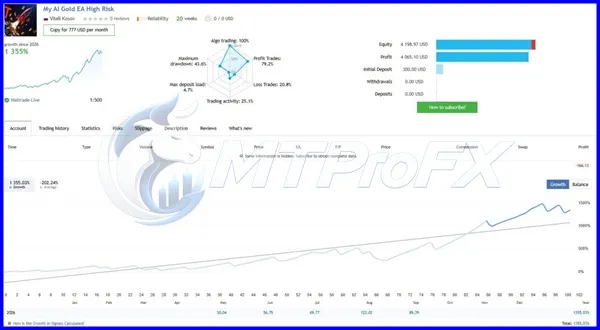
Backtest Results
Get My AI Gold EA MT5 v1.51 FREE (VIP Members Only)
Join a VIP Telegram group to get access. Pick your plan:
Conclusion
☑️ My AI Gold EA MT5 v1.51 is a tool to investigate if you are interested in automated gold trading on MetaTrader 5. Before using it, verify its actual features, confirm broker compatibility, evaluate its historical performance, and test it on a demo account.
A disciplined testing process is more valuable than relying on marketing claims or assuming that an EA's name guarantees intelligent trading. Automated trading involves financial risk, and you should never invest money you cannot afford to lose.
A disciplined testing process is more valuable than relying on marketing claims or assuming that an EA's name guarantees intelligent trading. Automated trading involves financial risk, and you should never invest money you cannot afford to lose.
What's Included
File Size
5.43 MB
File Type
ZIP
Downloads
110
Login to add your review.
micaljaky@gmail.com
Oct 10, 2026
I tested the EA on a demo account first and found the testing process useful for understanding its behavior. I recommend checking the settings carefully before trading.
It is an Expert Advisor identified as a gold-trading tool for MetaTrader 5. Its precise strategy and capabilities should be confirmed through the official documentation.
It appears intended for gold trading, but the exact supported symbol must be verified. Check whether your broker's XAUUSD symbol and any suffixes are supported.
The product name includes “AI,” but that alone does not prove that the software uses machine learning or an AI model. Consult the developer's technical documentation.
Beginners can learn to test an EA using a demo account. They should understand basic MT5 operation, trading risk, and position sizing before considering live use.
No profitability guarantee can be made without reliable, independently verifiable performance evidence. Even a successful backtest does not guarantee future results.
The recommended timeframe has not been verified. Use the developer's documented settings or compare timeframes with realistic historical testing.
Not necessarily. Broker symbol names, spreads, execution rules, minimum lot sizes, and account conditions can affect compatibility and performance.
A VPS may help keep MT5 running continuously, but whether one is necessary depends on your trading requirements and the EA's documented operating conditions.
Use MT5 Strategy Tester with realistic spreads and trading costs, then conduct forward testing on a demo account. Review drawdown, trade frequency, and execution behavior.
An MT5 EA is designed for MetaTrader 5 and generally cannot run directly on MT4. Check whether the developer offers a separate MT4 edition.