Back to Products
 0.0 (0 reviews)
Featured
Bestseller
Expert Advisors
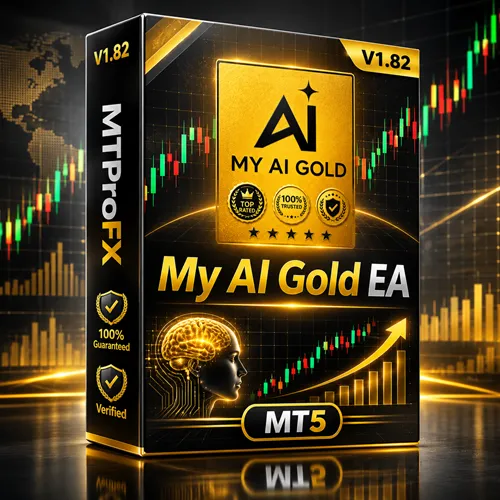
My AI Gold EA MT5 V1.82 + Set Files – Powerful Automated Gold Trading
$210.00
$16.99
91.91% OFF☑️ My AI Gold EA MT5 V1.82 is an automated Forex trading tool designed for traders who want to explore algorithmic trading opportunities in the gold market (XAUUSD). Compatible with MetaTrader 5, this Expert Advisor comes with dedicated set files to help simplify configuration and get started with automated trading. Whether you are an experienced algorithmic trader or exploring automated gold trading, My AI Gold EA V1.82 provides a convenient way to test and manage your trading strategy through the MT5 platform.
What is My AI Gold EA MT5 V1.82?
☑️ My AI Gold EA MT5 V1.82 is an automated Forex trading tool designed for traders who want to explore algorithmic trading opportunities in the gold market (XAUUSD). Compatible with MetaTrader 5, this Expert Advisor comes with dedicated set files to help simplify configuration and get started with automated trading.
Whether you are an experienced algorithmic trader or exploring automated gold trading, My AI Gold EA V1.82 provides a convenient way to test and manage your trading strategy through the MT5 platform.
Recommended Trading Currency Pairs
My AI Gold EA MT5 V1.82 is primarily intended for gold trading.
☑️ XAUUSD (Gold/USD): The primary recommended instrument for testing and evaluating the EA.
☑️ Other Gold Symbols: Some brokers offer alternative gold symbol formats, such as XAUUSD.a or XAUUSDm. Compatibility should be verified before live trading.
Important: Always check the EA's compatibility with your broker's symbol specifications, including contract size, execution conditions and minimum lot requirements. Do not assume that other currency pairs are supported without confirmation.
My AI Gold EA MT5 V1.82 Features
Spread Monitoring: Check the available spread conditions before enabling automated trading. Avoid trading during unusually wide spreads.
Slippage Awareness: Monitor execution prices to identify differences between requested and actual trade prices.
Volatility Considerations: Gold can experience sudden price movements during major economic announcements and unexpected market events.
Broker Compatibility: Test the EA using your broker's execution environment and account specifications.
Risk Management: Use conservative position sizes and monitor account exposure.
Demo Testing: Evaluate execution quality and trading behaviour before considering live deployment.
My AI Gold EA MT5 V1.82 – Best Settings
For a more controlled testing experience, consider the following configuration approach:
☑️ 1. Trading Instrument
Start with XAUUSD, provided it is supported by the EA and your broker.
☑️ 2. Set Files
Use the supplied set files as the starting configuration. Load the appropriate file through the EA's Inputs settings in MetaTrader 5.
☑️ 3. Risk Management
Begin with conservative risk exposure. Avoid increasing lot sizes simply to achieve faster results.
☑️ 4. Timeframe
Use the timeframe recommended in the supplied EA documentation or set-file instructions. If no timeframe is specified, test different suitable timeframes in Strategy Tester.
☑️ 5. Broker Conditions
Check spreads, commissions, execution speed and minimum trading volume before running the EA.
☑️ 6. Testing Environment
Run backtests using realistic historical tick data where available. Follow this with forward testing on a demo account.
☑️ 7. Live Trading Preparation
Only consider live trading after evaluating the EA under different market conditions and confirming that the configuration is appropriate for your account.
There is no universally profitable setting. Results depend on broker conditions, market behaviour, account size and risk configuration.
Instructions for Installing My AI Gold EA MT5 V1.82
Follow these steps to install My AI Gold EA MT5 V1.82 and its set files.
☑️ Step 1 – Download the Files
Download the My AI Gold EA MT5 V1.82 package, including the Expert Advisor and supplied set files.
☑️ Step 2 – Open MetaTrader 5
Launch your MetaTrader 5 trading platform.
☑️ Step 3 – Open the Data Folder
Navigate to:
File → Open Data Folder
☑️ Step 4 – Install the EA
Open the following directory:
MQL5 → Experts
Copy the My AI Gold EA file into this folder.
☑️ Step 5 – Install the Set Files
If the package includes .set files, place them in the appropriate MT5 Presets folder or another location accessible through the EA's Inputs settings.
☑️ Step 6 – Refresh MetaTrader 5
Return to MT5, open the Navigator panel, right-click Expert Advisors and select Refresh. Restart MT5 if necessary.
☑️ Step 7 – Attach the EA to the Chart
Open the supported gold trading chart and attach My AI Gold EA MT5 V1.82.
☑️ Step 8 – Load the Set File
Open the EA's Inputs settings, select Load and choose the supplied set file.
☑️ Step 9 – Enable Automated Trading
Review all parameters, enable Algo Trading and confirm that the EA is operating as expected.
☑️ Step 10 – Test Before Live Trading
Start with a demo account to evaluate performance, execution and risk exposure before using real funds.
Who Should Use My AI Gold EA MT5 V1.82?
My AI Gold EA MT5 V1.82 may be suitable for:
☑️ Gold Trading Enthusiasts: Traders interested in exploring automated XAUUSD trading strategies.
☑️ MT5 Users: Traders who prefer the MetaTrader 5 platform and its Expert Advisor functionality.
☑️ Algorithmic Trading Beginners: Users who want to learn how to configure and test automated trading systems.
☑️ Experienced Forex Traders: Traders interested in evaluating additional automated trading tools.
☑️ Strategy Testers: Users who enjoy analysing EA performance through historical backtesting and demo trading.
This EA may not be suitable for traders who expect guaranteed profits or cannot tolerate the financial risks associated with automated trading.
Download My AI Gold EA MT5 V1.82
Download My AI Gold EA MT5 V1.82Pros and Cons
Pros
Designed for automated gold trading.
Compatible with MetaTrader 5.
Includes supplied set files for configuration.
Provides an alternative to manually monitoring every trading opportunity.
Can be evaluated through MT5 Strategy Tester.
Suitable for demo testing before live deployment.
Cons
Trading performance is not guaranteed.
Results may vary between brokers.
Gold volatility can increase trading risk.
Requires appropriate configuration and monitoring.
Backtested performance does not guarantee future results.
Real trading involves potential financial losses.
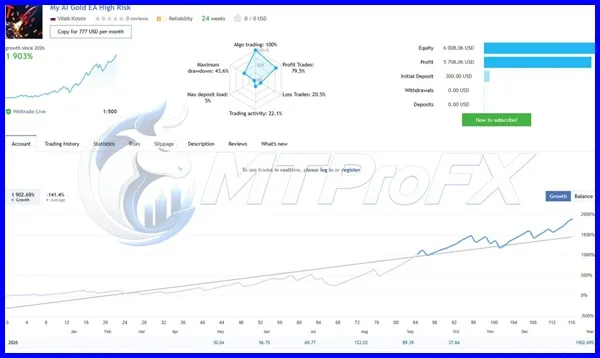
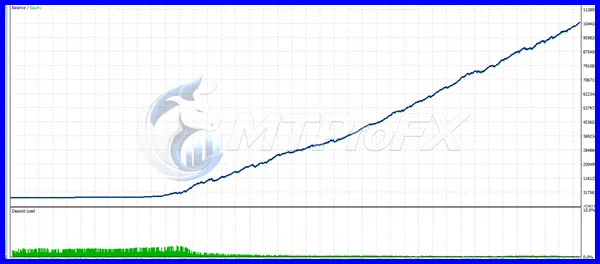
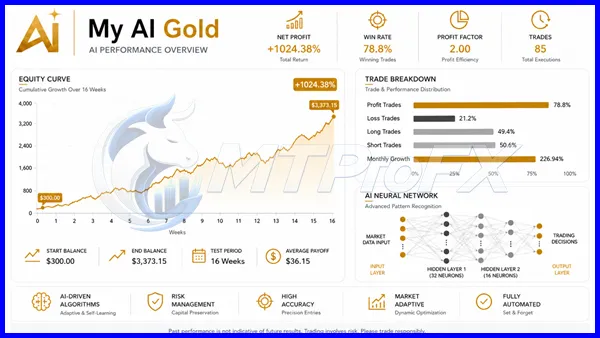
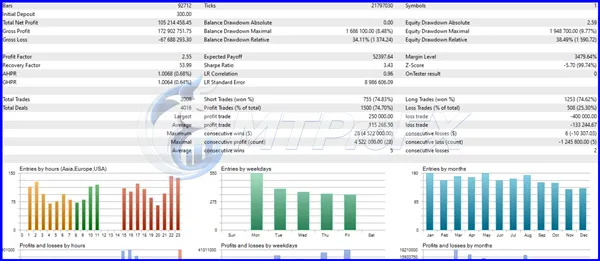
Backtest Results
Get My AI Gold EA MT5 V1.82 FREE (VIP Members Only)
Join a VIP Telegram group to get access. Pick your plan:
Conclusion
☑️ My AI Gold EA MT5 V1.82 + Set Files offers MT5 users an opportunity to explore automated gold trading without manually managing every trading decision. Its supplied set files provide a convenient starting point for configuration, while MetaTrader 5 offers tools for backtesting and performance evaluation.
For the best evaluation experience, use suitable broker conditions, conservative risk settings and thorough demo testing before considering live deployment.
Explore My AI Gold EA MT5 V1.82 today and discover another option for your automated XAUUSD trading toolkit.
Risk Disclaimer: Forex and gold trading involve substantial financial risk. Past performance does not guarantee future results. Always trade responsibly and only risk capital you can afford to lose.
What's Included
File Size
3.39 MB
File Type
ZIP
Downloads
124
Login to add your review.
jakaryesh@gmail.com
Nov 10, 2026
Easy to install on MT5. The included set files make the initial configuration more convenient. I am currently testing it on a demo account.
My AI Gold EA MT5 V1.82 is an Expert Advisor designed for automated trading on MetaTrader 5, with a primary focus on the gold trading market (XAUUSD).
Yes. The product package is specified as including set files to help users configure the Expert Advisor. Available presets may vary depending on the supplied package.
XAUUSD (Gold/USD) is the primary recommended instrument. Check the supplied documentation for supported broker symbol variations.
No. This version is designed for MetaTrader 5. An MT4-compatible version would need to be supplied separately.
Yes, beginners can explore the EA, but they should understand basic MT5 operations, EA installation and trading risk management before using a live account.
Attach the EA to a supported chart, open its Inputs settings, select Load and choose the appropriate supplied .set file.
Live-account use depends on the EA's compatibility with your broker and your risk tolerance. Always complete demo testing before considering live deployment.
No. No Forex Expert Advisor can guarantee profits. Trading involves financial risk, and market conditions can change unexpectedly.
A VPS is not necessarily required, but it can help keep MetaTrader 5 running continuously when your personal computer is switched off, provided the VPS is properly configured.
Choose a broker that offers suitable XAUUSD trading conditions, competitive spreads, reliable execution and compatibility with the EA's requirements. Test your chosen broker using a demo account first.