Back to Products
 0.0 (0 reviews)
Featured
Expert Advisors
PolyGold Scalper EA MT5 – Smart Gold Trading Robot for Automated Scalping
$345.00
$16.99
95.08% OFF☑️ PolyGold Scalper EA MT5 is a gold-focused automated trading Expert Advisor (EA) designed for MetaTrader 5. Explore its trading features, configuration options, risk management considerations, and automation insights to understand how this trading tool may fit into your XAUUSD trading strategy.
What is PolyGold Scalper EA MT5?
☑️ PolyGold Scalper EA MT5 is an automated trading robot designed primarily for gold trading (XAUUSD) on the MetaTrader 5 platform. The product is described as a short-term trading system that incorporates external market sentiment data to support its trading decisions.
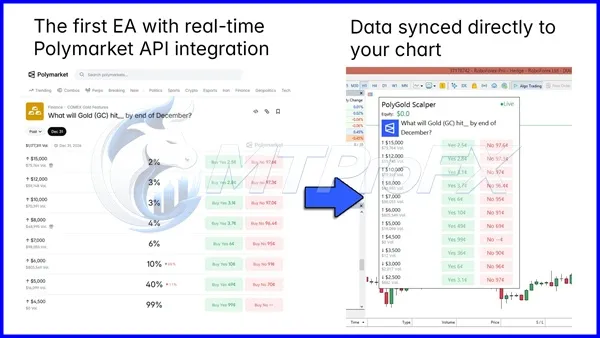
According to the available product information, the EA uses a Polymarket-derived data feed as an additional source of market context. Its described approach involves evaluating sentiment alongside gold price movements to identify potential trading opportunities.
The system is designed to automate trade entries and position management, potentially reducing the need for constant manual chart monitoring.
However, automated trading does not eliminate market risk. Actual results depend on market conditions, broker execution, spreads, slippage, account settings, and the EA's implementation.
According to the available product information, the EA uses a Polymarket-derived data feed as an additional source of market context. Its described approach involves evaluating sentiment alongside gold price movements to identify potential trading opportunities.
The system is designed to automate trade entries and position management, potentially reducing the need for constant manual chart monitoring.
However, automated trading does not eliminate market risk. Actual results depend on market conditions, broker execution, spreads, slippage, account settings, and the EA's implementation.
Recommended Trading Currency Pairs
☑️ XAUUSD – Gold Against the US Dollar
XAUUSD is the primary instrument associated with PolyGold Scalper MT5.
Gold can experience substantial price movements in response to economic announcements, changes in interest rates, US dollar fluctuations, and geopolitical developments.
A gold-focused scalping system may appeal to traders looking to automate short-term trading decisions in this market.
Before trading live, check your broker's gold symbol, contract specifications, minimum volume, spread, and margin requirements.
☑️ Other Trading Instruments
PolyGold Scalper is described as a gold-focused EA rather than a general-purpose multi-currency robot.
Do not assume it supports EURUSD, GBPUSD, USDJPY, cryptocurrency pairs, or stock indices unless the supplied product documentation explicitly confirms compatibility.
Recommendation: Start by testing the EA on XAUUSD using a demo account and the instrument settings specified in the product documentation.
XAUUSD is the primary instrument associated with PolyGold Scalper MT5.
Gold can experience substantial price movements in response to economic announcements, changes in interest rates, US dollar fluctuations, and geopolitical developments.
A gold-focused scalping system may appeal to traders looking to automate short-term trading decisions in this market.
Before trading live, check your broker's gold symbol, contract specifications, minimum volume, spread, and margin requirements.
☑️ Other Trading Instruments
PolyGold Scalper is described as a gold-focused EA rather than a general-purpose multi-currency robot.
Do not assume it supports EURUSD, GBPUSD, USDJPY, cryptocurrency pairs, or stock indices unless the supplied product documentation explicitly confirms compatibility.
Recommendation: Start by testing the EA on XAUUSD using a demo account and the instrument settings specified in the product documentation.
PolyGold Scalper EA MT5 Features
Automated Gold Trading - The EA is designed to automate trading decisions for XAUUSD through MetaTrader 5. Automation may help reduce repetitive manual tasks, although the system still requires appropriate configuration and monitoring.
Market Sentiment Integration - The described strategy incorporates sentiment data derived from Polymarket as an additional input when evaluating potential gold trading opportunities.
Automated Position Management - The product description indicates that the EA manages individual trades using its own exit logic. The exact behaviour should be verified in the supplied version, including how positions are closed during volatile conditions or when the external data feed becomes unavailable.
Volatility-Based Exit Management - The published product information describes dynamic virtual stop-loss and trailing-stop logic based on daily volatility. Virtual protection is not necessarily equivalent to a broker-held stop-loss order. Its effectiveness can depend on the terminal running correctly, the internet connection remaining active, and the EA being able to execute its exit instructions.
No Grid or Martingale Strategy - The described version uses individual trade entries rather than grid-based recovery or martingale lot multiplication. This can avoid the specific risk of systematically increasing exposure to recover previous losses. However, the absence of grid or martingale trading does not mean the strategy is risk-free.
MetaTrader 5 Compatibility - PolyGold Scalper is designed for MetaTrader 5, allowing traders to operate the EA within the desktop trading terminal. Check the product files and documentation to confirm the supported version, installation requirements, and any required permissions.
PolyGold Scalper EA MT5 – Best Settings
The following settings are a starting point based on the published product specifications, not a guarantee of optimal performance.
☑️ Trading Instrument
Use XAUUSD, or the equivalent gold symbol provided by your broker, unless your product documentation specifies otherwise.
☑️ Timeframe
The published configuration recommends the H1 timeframe. Begin testing on H1 rather than assuming that lower timeframes will produce better scalping results.
☑️ Starting Deposit
The published product information suggests a deposit of approximately $200. This is a product recommendation, not a guarantee that the balance is sufficient for every broker or configuration.
A larger balance does not automatically make a trading strategy safer. Position size, margin requirements, drawdown tolerance, and the potential loss on each trade are more important considerations.
☑️ Account Type
The described product supports consideration of Standard, ECN, Raw, and Cent account types. Confirm compatibility with your particular broker before using a live account.
Compare spreads, commissions, execution quality, and minimum trading volume. These factors can materially affect the performance of short-term trading systems.
☑️ Risk Management
Use conservative position sizing and establish an acceptable maximum drawdown before activating the EA.
As a general risk-management example, some traders choose to risk no more than 0.5%–1% of account equity per trade. This is an illustrative guideline, not a verified PolyGold Scalper setting or a guarantee against losses.
Also consider the following:
Test the EA on a demo account before live trading.
Verify whether a broker-side stop-loss can be configured.
Monitor floating losses and account equity.
Avoid increasing lot sizes to recover previous losses.
Test the system during different gold market conditions.
Confirm how the EA behaves if its external data source or internet connection fails.
☑️ External Data Configuration
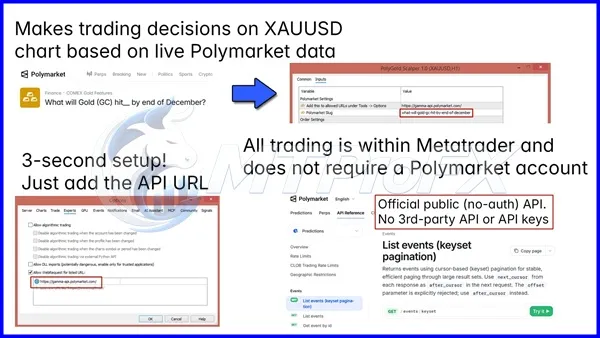
The published product description indicates that the EA requires its data-feed URL to be added to MetaTrader 5's allowed WebRequest list.
Follow the instructions supplied with your specific product files. Only authorize the documented endpoint required by the EA.
☑️ Trading Instrument
Use XAUUSD, or the equivalent gold symbol provided by your broker, unless your product documentation specifies otherwise.
☑️ Timeframe
The published configuration recommends the H1 timeframe. Begin testing on H1 rather than assuming that lower timeframes will produce better scalping results.
☑️ Starting Deposit
The published product information suggests a deposit of approximately $200. This is a product recommendation, not a guarantee that the balance is sufficient for every broker or configuration.
A larger balance does not automatically make a trading strategy safer. Position size, margin requirements, drawdown tolerance, and the potential loss on each trade are more important considerations.
☑️ Account Type
The described product supports consideration of Standard, ECN, Raw, and Cent account types. Confirm compatibility with your particular broker before using a live account.
Compare spreads, commissions, execution quality, and minimum trading volume. These factors can materially affect the performance of short-term trading systems.
☑️ Risk Management
Use conservative position sizing and establish an acceptable maximum drawdown before activating the EA.
As a general risk-management example, some traders choose to risk no more than 0.5%–1% of account equity per trade. This is an illustrative guideline, not a verified PolyGold Scalper setting or a guarantee against losses.
Also consider the following:
Test the EA on a demo account before live trading.
Verify whether a broker-side stop-loss can be configured.
Monitor floating losses and account equity.
Avoid increasing lot sizes to recover previous losses.
Test the system during different gold market conditions.
Confirm how the EA behaves if its external data source or internet connection fails.
☑️ External Data Configuration
The published product description indicates that the EA requires its data-feed URL to be added to MetaTrader 5's allowed WebRequest list.
Follow the instructions supplied with your specific product files. Only authorize the documented endpoint required by the EA.
Instructions for Installing PolyGold Scalper EA MT5
Follow these general steps to install an Expert Advisor in MetaTrader 5. Any product-specific setup requirements take priority.
☑️ Step 1: Download the Product Files
Download PolyGold Scalper MT5 from your authorized purchase or download page.
Extract the downloaded archive if the files are compressed.
☑️ Step 2: Open MetaTrader 5
Launch the MetaTrader 5 desktop terminal.
Select File → Open Data Folder to access the terminal's data directory.
☑️ Step 3: Locate the Experts Folder
Open the following directory:
MQL5 → Experts
Copy the supplied EA file into the appropriate folder.
If your download contains an already compiled .ex5 file, use the instructions provided for that file. Do not assume that source code or a separate compiled file is included unless it is actually supplied.
☑️ Step 4: Refresh the Navigator
Return to MetaTrader 5.
In the Navigator panel, refresh the Expert Advisors section or restart the terminal if necessary.
Confirm that PolyGold Scalper appears in the list.
☑️ Step 5: Open the XAUUSD Chart
Open the gold chart and select the H1 timeframe if following the published recommended configuration.
Check that the symbol matches the instrument supported by your broker and the EA.
☑️ Step 6: Attach the EA
Drag PolyGold Scalper onto the chart.
Review the available inputs and configure the settings according to the supplied documentation.
Enable algorithmic trading where required.
☑️ Step 7: Configure WebRequest if Required
If your version uses the documented external sentiment feed, open the Expert Advisors settings in MetaTrader 5 and add the required URL to the permitted WebRequest list.
Use only the endpoint specified in the product documentation.
☑️ Step 8: Test Before Live Trading
Check the Experts and Journal tabs for errors or connection issues.
Run the EA on a demo account and verify that it behaves as expected before committing real funds.
Important: Some EAs that depend on external data may not reproduce their live decision-making accurately in the Strategy Tester. Confirm the testing limitations of your specific version before interpreting backtest results.
☑️ Step 1: Download the Product Files
Download PolyGold Scalper MT5 from your authorized purchase or download page.
Extract the downloaded archive if the files are compressed.
☑️ Step 2: Open MetaTrader 5
Launch the MetaTrader 5 desktop terminal.
Select File → Open Data Folder to access the terminal's data directory.
☑️ Step 3: Locate the Experts Folder
Open the following directory:
MQL5 → Experts
Copy the supplied EA file into the appropriate folder.
If your download contains an already compiled .ex5 file, use the instructions provided for that file. Do not assume that source code or a separate compiled file is included unless it is actually supplied.
☑️ Step 4: Refresh the Navigator
Return to MetaTrader 5.
In the Navigator panel, refresh the Expert Advisors section or restart the terminal if necessary.
Confirm that PolyGold Scalper appears in the list.
☑️ Step 5: Open the XAUUSD Chart
Open the gold chart and select the H1 timeframe if following the published recommended configuration.
Check that the symbol matches the instrument supported by your broker and the EA.
☑️ Step 6: Attach the EA
Drag PolyGold Scalper onto the chart.
Review the available inputs and configure the settings according to the supplied documentation.
Enable algorithmic trading where required.
☑️ Step 7: Configure WebRequest if Required
If your version uses the documented external sentiment feed, open the Expert Advisors settings in MetaTrader 5 and add the required URL to the permitted WebRequest list.
Use only the endpoint specified in the product documentation.
☑️ Step 8: Test Before Live Trading
Check the Experts and Journal tabs for errors or connection issues.
Run the EA on a demo account and verify that it behaves as expected before committing real funds.
Important: Some EAs that depend on external data may not reproduce their live decision-making accurately in the Strategy Tester. Confirm the testing limitations of your specific version before interpreting backtest results.
Who Should Use PolyGold Scalper EA MT5?
PolyGold Scalper MT5 may be suitable for:
☑️ Gold traders: Traders who primarily focus on XAUUSD.
☑️ MetaTrader 5 users: Traders who want to explore automated trading within MT5.
☑️ Automation enthusiasts: Users interested in evaluating an EA that incorporates external sentiment data.
☑️ Systematic traders: Traders who prefer testing a defined strategy rather than making every entry manually.
☑️ Experienced algorithmic traders: Users who understand execution risks, external data dependencies, and the importance of drawdown monitoring.
Who Should Avoid It?
☑️ This EA may not be suitable for people who expect guaranteed profits, cannot tolerate trading losses, or lack the time to monitor an automated strategy.
☑️ Beginners should first learn how leverage, margin, stop-loss orders, and gold volatility affect their accounts.
☑️ Gold traders: Traders who primarily focus on XAUUSD.
☑️ MetaTrader 5 users: Traders who want to explore automated trading within MT5.
☑️ Automation enthusiasts: Users interested in evaluating an EA that incorporates external sentiment data.
☑️ Systematic traders: Traders who prefer testing a defined strategy rather than making every entry manually.
☑️ Experienced algorithmic traders: Users who understand execution risks, external data dependencies, and the importance of drawdown monitoring.
Who Should Avoid It?
☑️ This EA may not be suitable for people who expect guaranteed profits, cannot tolerate trading losses, or lack the time to monitor an automated strategy.
☑️ Beginners should first learn how leverage, margin, stop-loss orders, and gold volatility affect their accounts.
Download PolyGold Scalper EA MT5
Download PolyGold Scalper EA MT5Pros and Cons
Pros
Designed specifically for gold trading.
Compatible with the MetaTrader 5 trading platform.
Incorporates external sentiment data into its described approach.
Automates trade entries and position management.
The published strategy does not use grid or martingale recovery.
Provides an opportunity to evaluate sentiment-based algorithmic trading.
Can be tested on a demo account before live deployment.
Cons
Focused primarily on XAUUSD rather than multiple currency pairs.
Performance can vary with market conditions and broker execution.
External data connectivity may affect trading decisions.
Virtual exit mechanisms may introduce additional operational considerations.
Backtest results may not fully represent live performance when external data is involved.
Requires appropriate configuration and ongoing risk monitoring.
No trading robot can guarantee profits or eliminate drawdown.
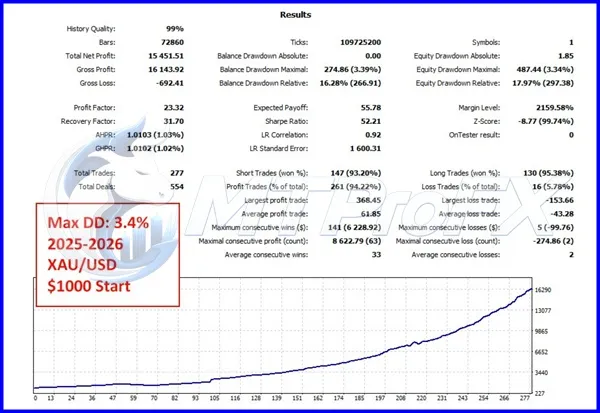
Backtest Results
Get PolyGold Scalper EA MT5 FREE (VIP Members Only)
Join a VIP Telegram group to get access. Pick your plan:
Conclusion
☑️ PolyGold Scalper EA MT5 is a gold-focused trading robot for MetaTrader 5 that explores the use of external sentiment data in automated XAUUSD trading.
Its described features include automated trade management, volatility-based exit logic, and a strategy that does not rely on grid or martingale recovery.
For traders interested in algorithmic gold trading, the most sensible approach is to verify the product's specifications, follow the documented installation process, test it on a demo account, and assess its risk characteristics before live deployment.
Explore PolyGold Scalper EA MT5 to learn more about its features, configuration requirements, and potential role in your automated gold trading setup. Remember that all trading involves risk and results are never guaranteed.
Its described features include automated trade management, volatility-based exit logic, and a strategy that does not rely on grid or martingale recovery.
For traders interested in algorithmic gold trading, the most sensible approach is to verify the product's specifications, follow the documented installation process, test it on a demo account, and assess its risk characteristics before live deployment.
Explore PolyGold Scalper EA MT5 to learn more about its features, configuration requirements, and potential role in your automated gold trading setup. Remember that all trading involves risk and results are never guaranteed.
What's Included
File Size
62.4 KB
File Type
ZIP
Downloads
132
Login to add your review.
vbmaharaj2@gmail.com
Oct 26, 2026
I like the idea of exploring automated gold trading through MT5. The configuration and trading behaviour should be tested carefully before using a live account.
PolyGold Scalper EA MT5 is an automated trading Expert Advisor designed primarily for XAUUSD gold trading on the MetaTrader 5 platform. Its published description indicates that it incorporates external market sentiment data into its trading approach.
The published product information identifies MetaTrader 5 as its supported platform. Do not assume an MT4 version is available unless the developer explicitly provides one.
The EA is primarily designed for XAUUSD, which represents gold priced in US dollars. Confirm the exact symbol supported by your broker before installation.
The published product specifications recommend H1. Test the recommended configuration first and consult the supplied documentation before changing the timeframe.
The described version uses individual trade entries and is advertised as not using grid or martingale recovery. Verify this behaviour in the specific version you receive.
No. Forex and gold trading involve financial risk. Historical results, advertised performance, and automated execution cannot guarantee future profitability.
The EA is designed to operate within MetaTrader 5, but you should test it on a demo account first. Confirm the broker's compatibility, required permissions, execution conditions, and risk settings before live deployment.
A VPS may help maintain an uninterrupted trading environment, but whether it is required depends on your setup and the EA's operating requirements. If the EA relies on virtual exit logic, continuous terminal operation and connectivity are especially important.
Differences may arise from spreads, slippage, tick modelling, market conditions, and the availability of external data. If the EA depends on a live WebRequest feed, verify whether the Strategy Tester can reproduce that data and the EA's corresponding decisions.
Copy the supplied EA file into the appropriate MQL5/Experts directory, refresh the Navigator, attach the EA to the supported chart, and configure its settings. Complete any documented external data-feed setup before testing.
The published product information suggests approximately $200. However, the appropriate starting balance depends on the broker's margin requirements, minimum lot size, account type, and the risk settings you intend to use.
Beginners can study and demo-test the EA, but should understand gold volatility, leverage, margin, and drawdown before using real money. Automated execution does not remove the need for risk management.