Back to Products
 0.0 (0 reviews)
Featured
Bestseller
Expert Advisors
SmartChoise EA v9.7 MT5 – Advanced Forex Trading Robot for MetaTrader 5
$210.00
$16.99
91.91% OFF☑️ SmartChoise EA v9.7 MT5 is an Expert Advisor designed for the MetaTrader 5 platform. Explore automated forex trading, configurable trading parameters, and rule-based execution while evaluating compatibility, recommended settings, and risk management through backtesting and demo trading.
What is SmartChoise EA v9.7 MT5?
☑️ SmartChoise EA v9.7 MT5 is a Forex Expert Advisor (EA) designed for the MetaTrader 5 trading platform. Expert Advisors automate trading operations according to programmed rules, helping traders execute strategies without manually placing every order.
SmartChoise EA is intended for traders interested in exploring automated trading and improving consistency in their trading routines. Depending on its actual programming and configuration, an EA may manage trade entries, exits, position sizes, and other trading parameters.
Before using SmartChoise EA v9.7 MT5 on a live account, traders should verify its supported instruments, recommended settings, trading logic, and compatibility with their broker.
Important: Verified documentation and independently validated performance data were not provided for this specific EA. Therefore, its exact strategy, profitability, and advanced features should not be assumed without testing.
SmartChoise EA is intended for traders interested in exploring automated trading and improving consistency in their trading routines. Depending on its actual programming and configuration, an EA may manage trade entries, exits, position sizes, and other trading parameters.
Before using SmartChoise EA v9.7 MT5 on a live account, traders should verify its supported instruments, recommended settings, trading logic, and compatibility with their broker.
Important: Verified documentation and independently validated performance data were not provided for this specific EA. Therefore, its exact strategy, profitability, and advanced features should not be assumed without testing.
Recommended Trading Currency Pairs
The most suitable currency pairs for SmartChoise EA v9.7 MT5 depend on its underlying strategy, broker conditions, and recommended configuration.
The following pairs are candidates for evaluation rather than verified official recommendations.
1. EUR/USD
EUR/USD is one of the most actively traded forex pairs. Its generally high liquidity can make it a useful starting point when testing an automated trading strategy.
2. GBP/USD
GBP/USD can offer substantial price movements, creating opportunities for some automated strategies. However, volatility can also increase losses and slippage.
3. USD/JPY
USD/JPY is another major currency pair worth evaluating. Traders should consider spread fluctuations, market sessions, and economic announcements.
4. AUD/USD
AUD/USD may be suitable for testing strategies designed for major currency pairs. Its behavior can vary with commodity prices and developments in the Australian and US economies.
5. EUR/GBP
EUR/GBP can provide an additional testing instrument for strategies that perform differently across currency pairs. Its suitability depends on the EA's entry and exit logic.
Recommendation: Start with one currency pair on a demo account. Test additional pairs individually before running the EA across multiple instruments.
The following pairs are candidates for evaluation rather than verified official recommendations.
1. EUR/USD
EUR/USD is one of the most actively traded forex pairs. Its generally high liquidity can make it a useful starting point when testing an automated trading strategy.
2. GBP/USD
GBP/USD can offer substantial price movements, creating opportunities for some automated strategies. However, volatility can also increase losses and slippage.
3. USD/JPY
USD/JPY is another major currency pair worth evaluating. Traders should consider spread fluctuations, market sessions, and economic announcements.
4. AUD/USD
AUD/USD may be suitable for testing strategies designed for major currency pairs. Its behavior can vary with commodity prices and developments in the Australian and US economies.
5. EUR/GBP
EUR/GBP can provide an additional testing instrument for strategies that perform differently across currency pairs. Its suitability depends on the EA's entry and exit logic.
Recommendation: Start with one currency pair on a demo account. Test additional pairs individually before running the EA across multiple instruments.
SmartChoise EA v9.7 MT5 Features
Automated Trading Execution - An Expert Advisor can execute trades automatically when its programmed entry conditions are satisfied, reducing the need for constant manual monitoring.
MetaTrader 5 Compatibility - The product name identifies MT5 as its intended platform. Confirm that the supplied EA file is compatible with your MetaTrader 5 installation before use.
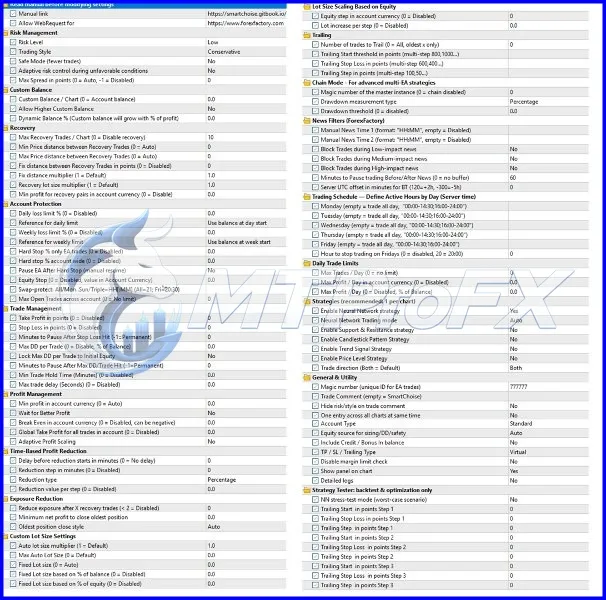
Configurable Trading Parameters - Depending on the EA's design, available inputs may allow traders to adjust lot size, trade filters, stop-loss settings, take-profit levels, and other parameters.
Rule-Based Trading - Automated systems follow programmed instructions rather than making decisions based on emotions. Their results still depend on the quality of the underlying strategy and the conditions in which they operate.
Potential for Consistent Execution - An EA can apply its programmed rules consistently, provided the platform is running correctly and the broker permits the required trading operations.
Risk Management Considerations - Traders should check whether the EA supports stop-loss orders, position-size controls, maximum trade limits, or other protective mechanisms. The presence of these controls must be confirmed in the product's actual settings.
SmartChoise EA v9.7 MT5 – Best Settings
1. Choose a Suitable Currency Pair
☑️ Begin with a major currency pair such as EUR/USD. Check the EA's documentation for its officially supported instruments before selecting a pair.
2. Select the Appropriate Timeframe
☑️ Use the timeframe specified by the developer, if available. If no timeframe is documented, test different timeframes in the Strategy Tester rather than assuming that M5, M15, or H1 is optimal.
3. Start With Conservative Position Sizing
☑️ Use the smallest practical position size supported by the broker and EA. Avoid increasing lot sizes simply to accelerate potential returns.
4. Configure Stop-Loss and Take-Profit
☑️ If the EA provides stop-loss and take-profit settings, understand how they work before enabling live trading. Do not assume that protective orders are present by default.
5. Review Spread and Slippage
☑️ Trading costs can materially affect automated strategies, especially those that open and close positions frequently. Test the EA under realistic spread, commission, and slippage conditions.
6. Avoid Unverified High-Risk Settings
☑️ Do not enable aggressive lot multipliers, grid trading, martingale options, or unlimited position settings unless you fully understand the risks and have verified that these features actually exist in the EA.
7. Test Before Live Trading
☑️ Run a historical backtest using realistic trading costs, followed by forward testing on a demo account. Evaluate drawdown, trade frequency, average trade outcome, and performance across different market conditions.
Suggested starting approach: Use a demo account, one supported currency pair, conservative risk exposure, and the developer's documented default settings. Adjust one parameter at a time and record the results.
☑️ Begin with a major currency pair such as EUR/USD. Check the EA's documentation for its officially supported instruments before selecting a pair.
2. Select the Appropriate Timeframe
☑️ Use the timeframe specified by the developer, if available. If no timeframe is documented, test different timeframes in the Strategy Tester rather than assuming that M5, M15, or H1 is optimal.
3. Start With Conservative Position Sizing
☑️ Use the smallest practical position size supported by the broker and EA. Avoid increasing lot sizes simply to accelerate potential returns.
4. Configure Stop-Loss and Take-Profit
☑️ If the EA provides stop-loss and take-profit settings, understand how they work before enabling live trading. Do not assume that protective orders are present by default.
5. Review Spread and Slippage
☑️ Trading costs can materially affect automated strategies, especially those that open and close positions frequently. Test the EA under realistic spread, commission, and slippage conditions.
6. Avoid Unverified High-Risk Settings
☑️ Do not enable aggressive lot multipliers, grid trading, martingale options, or unlimited position settings unless you fully understand the risks and have verified that these features actually exist in the EA.
7. Test Before Live Trading
☑️ Run a historical backtest using realistic trading costs, followed by forward testing on a demo account. Evaluate drawdown, trade frequency, average trade outcome, and performance across different market conditions.
Suggested starting approach: Use a demo account, one supported currency pair, conservative risk exposure, and the developer's documented default settings. Adjust one parameter at a time and record the results.
Instructions for Installing SmartChoise EA v9.7 MT5
☑️ Step 1: Download the EA Files
Download SmartChoise EA v9.7 MT5 from your authorized source. Extract the archive if the files are provided in ZIP format.
☑️ Step 2: Open MetaTrader 5
Launch MetaTrader 5 on your computer.
☑️ Step 3: Open the Data Folder
In the platform menu, select File → Open Data Folder.
☑️ Step 4: Locate the Experts Folder
Open the following directory:
MQL5 → Experts
Copy the supplied .ex5 Expert Advisor file into this folder. If the package includes additional files, follow the developer's installation instructions.
☑️ Step 5: Refresh the Navigator
Return to MetaTrader 5. In the Navigator panel, right-click Expert Advisors and select Refresh. Alternatively, restart the platform.
☑️ Step 6: Open a Supported Chart
Open a chart for a currency pair supported by the EA. Select the timeframe specified in the product documentation.
☑️ Step 7: Attach the EA
Drag SmartChoise EA onto the chart. Review the available input parameters and configure them according to the official instructions.
☑️ Step 8: Enable Automated Trading
Enable the platform's Algo Trading function if required. Check the EA's settings and permissions before allowing it to place trades.
☑️ Step 9: Confirm That It Is Running
Review the chart, EA status, and Experts and Journal tabs for errors or connection issues.
☑️ Step 10: Test on a Demo Account
Monitor its behavior before considering live trading. Confirm that orders, position sizes, and risk controls behave as expected.
Download SmartChoise EA v9.7 MT5 from your authorized source. Extract the archive if the files are provided in ZIP format.
☑️ Step 2: Open MetaTrader 5
Launch MetaTrader 5 on your computer.
☑️ Step 3: Open the Data Folder
In the platform menu, select File → Open Data Folder.
☑️ Step 4: Locate the Experts Folder
Open the following directory:
MQL5 → Experts
Copy the supplied .ex5 Expert Advisor file into this folder. If the package includes additional files, follow the developer's installation instructions.
☑️ Step 5: Refresh the Navigator
Return to MetaTrader 5. In the Navigator panel, right-click Expert Advisors and select Refresh. Alternatively, restart the platform.
☑️ Step 6: Open a Supported Chart
Open a chart for a currency pair supported by the EA. Select the timeframe specified in the product documentation.
☑️ Step 7: Attach the EA
Drag SmartChoise EA onto the chart. Review the available input parameters and configure them according to the official instructions.
☑️ Step 8: Enable Automated Trading
Enable the platform's Algo Trading function if required. Check the EA's settings and permissions before allowing it to place trades.
☑️ Step 9: Confirm That It Is Running
Review the chart, EA status, and Experts and Journal tabs for errors or connection issues.
☑️ Step 10: Test on a Demo Account
Monitor its behavior before considering live trading. Confirm that orders, position sizes, and risk controls behave as expected.
Who Should Use SmartChoise EA v9.7 MT5?
☑️ Forex Traders Interested in Automation
Traders who want to explore automated order execution may find an MT5 Expert Advisor useful.
☑️ Traders Who Prefer Rule-Based Execution
Users who want to apply a predefined trading approach without manually placing every trade may benefit from learning how an EA operates.
☑️ Experienced MetaTrader 5 Users
Traders familiar with charts, order execution, broker specifications, and Strategy Tester results are better positioned to evaluate automated trading software.
☑️ Traders Who Can Monitor Risk
Users who understand drawdown, leverage, margin requirements, and the possibility of losing their trading capital are better prepared to assess the risks of automated systems.
☑️ Traders Who Want to Backtest Strategies
Users interested in comparing historical performance with demo-account results can use MetaTrader 5 testing tools to investigate an EA's behavior.
Who should avoid it?
☑️ Beginners expecting guaranteed profits, users who cannot afford trading losses, and traders unwilling to test or monitor the software should avoid deploying an unfamiliar EA on a live account.
Traders who want to explore automated order execution may find an MT5 Expert Advisor useful.
☑️ Traders Who Prefer Rule-Based Execution
Users who want to apply a predefined trading approach without manually placing every trade may benefit from learning how an EA operates.
☑️ Experienced MetaTrader 5 Users
Traders familiar with charts, order execution, broker specifications, and Strategy Tester results are better positioned to evaluate automated trading software.
☑️ Traders Who Can Monitor Risk
Users who understand drawdown, leverage, margin requirements, and the possibility of losing their trading capital are better prepared to assess the risks of automated systems.
☑️ Traders Who Want to Backtest Strategies
Users interested in comparing historical performance with demo-account results can use MetaTrader 5 testing tools to investigate an EA's behavior.
Who should avoid it?
☑️ Beginners expecting guaranteed profits, users who cannot afford trading losses, and traders unwilling to test or monitor the software should avoid deploying an unfamiliar EA on a live account.
Download SmartChoise EA v9.7 MT5
Download SmartChoise EA v9.7 MT5Pros and Cons
Pros
Automated execution: Can reduce the need for manual order placement.
Rule-based operation: Applies programmed trading conditions consistently.
MT5 environment: Designed for use within the MetaTrader 5 ecosystem, subject to file compatibility.
Testing opportunities: Can be evaluated using historical data and demo trading.
Potential time savings: May reduce the time spent manually monitoring and executing trades.
Cons
Performance is uncertain: Profitability cannot be established from the product name alone.
Market risks remain: Automated strategies can lose money during unfavorable conditions.
Broker conditions matter: Spreads, commissions, slippage, and execution speed may affect results.
Monitoring is necessary: Platform failures, connectivity problems, and unexpected trading behavior require attention.
Documentation is essential: Exact features, supported pairs, and recommended settings need confirmation.
Historical results have limitations: Backtests do not guarantee future performance.
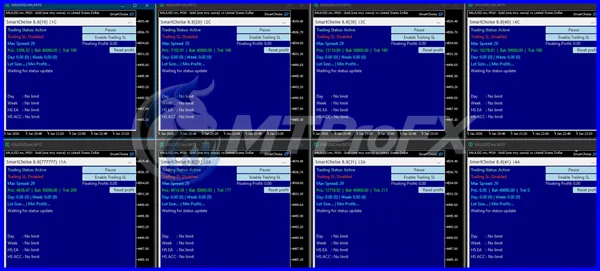
Backtest Results
Conclusion
☑️ SmartChoise EA v9.7 MT5 is an automated trading tool intended for the MetaTrader 5 environment. It may interest forex traders who want to explore rule-based trading execution and evaluate automated strategies.
Before using it with real money, verify its supported currency pairs, settings, trading logic, and compatibility. Use historical backtesting and demo-account forward testing to examine its behavior, and pay particular attention to drawdown, trading costs, and position sizing.
The most responsible approach is to evaluate SmartChoise EA v9.7 MT5 using evidence rather than relying on profit claims. Automated trading can simplify execution, but it does not eliminate market risk or guarantee positive returns.
Before using it with real money, verify its supported currency pairs, settings, trading logic, and compatibility. Use historical backtesting and demo-account forward testing to examine its behavior, and pay particular attention to drawdown, trading costs, and position sizing.
The most responsible approach is to evaluate SmartChoise EA v9.7 MT5 using evidence rather than relying on profit claims. Automated trading can simplify execution, but it does not eliminate market risk or guarantee positive returns.
What's Included
File Size
331 KB
File Type
ZIP
Downloads
118
Login to add your review.
karlandreson@gmail.com
Oct 26, 2026
Installation was straightforward after following the setup instructions. I tested the EA on a demo account first and checked its behavior before considering live trading.
SmartChoise EA v9.7 MT5 is an Expert Advisor identified for the MetaTrader 5 platform. Expert Advisors automate trading tasks according to predefined programming rules.
The product name specifies MT5. MT4 uses a different platform environment and file format, so you should not assume that the EA is compatible with MT4.
EUR/USD, GBP/USD, USD/JPY, AUD/USD, and EUR/GBP are possible candidates for testing. However, the EA's official supported pairs should be confirmed before use.
The best timeframe depends on the EA's trading logic and developer recommendations. Check the documentation and test the relevant timeframes in MetaTrader 5 before selecting one.
Consistent profits cannot be guaranteed. Performance depends on the strategy, market conditions, execution costs, and risk management. Independent testing is necessary to evaluate its potential.
Beginners can learn to install and evaluate an Expert Advisor on a demo account. However, they should understand basic forex trading, leverage, margin, and drawdown before using real money.
A VPS may help keep MetaTrader 5 running when a computer is switched off, but whether a VPS is necessary depends on the user's setup and the EA's operating requirements.
Copy the compatible EA file into the MQL5/Experts folder in the MetaTrader 5 data directory, refresh the Navigator, attach the EA to a supported chart, and configure its settings according to the developer's instructions.
Suitability depends on the broker's minimum trade size, margin requirements, the EA's position-sizing logic, and its maximum potential drawdown. Test it on a demo account and assess the risk before using a small live account.
Use the MetaTrader 5 Strategy Tester with realistic trading costs, then forward-test the EA on a demo account. Review drawdown, trade frequency, net results, and performance under different market conditions.
This cannot be confirmed without verified product documentation or inspection of the EA's settings and behavior. Check the available parameters and understand any position-escalation strategy before enabling live trading.
An EA can generally operate while MetaTrader 5 is running, connected, and permitted to trade. Continuous operation may require a stable computer or VPS, depending on the user's requirements.