
SomaOil EA MT5 v3.3 Review – 20 Oil Breakout Strategies & Risk Tools
$16.99
93.93% OFF☑️ SomaOil EA MT5 v3.3 is presented as an automated trading robot for MetaTrader 5 that focuses on WTI crude oil. Its strategy combines multiple breakout approaches across different timeframes to identify potential trading opportunities in the oil market. Unlike Forex robots designed primarily for currency pairs such as EURUSD or GBPUSD, SomaOil is built around the crude oil symbol commonly identified as XTIUSD. Its documented design includes multiple independent strategies, configurable position sizing, news filters, spread controls and an on-chart monitoring dashboard. The EA is intended to automate trade execution according to its programmed rules. However, automated trading does not guarantee profits, and actual results can vary depending on broker conditions, spreads, slippage and market volatility.
What is SomaOil EA MT5 v3.3?
Unlike Forex robots designed primarily for currency pairs such as EURUSD or GBPUSD, SomaOil is built around the crude oil symbol commonly identified as XTIUSD. Its documented design includes multiple independent strategies, configurable position sizing, news filters, spread controls and an on-chart monitoring dashboard.
The EA is intended to automate trade execution according to its programmed rules. However, automated trading does not guarantee profits, and actual results can vary depending on broker conditions, spreads, slippage and market volatility.
Recommended Trading Currency Pairs
☑️ XTIUSD: The main recommended instrument for WTI crude oil.
☑️ USOIL / USOUSD: Alternative broker-specific oil symbols that may be supported.
☑️ WTI / SpotCrude: Other possible broker naming conventions.
Symbol compatibility depends on the broker and the EA build. Check the exact symbol requirements before installation. Do not assume that the EA is suitable for EURUSD, GBPUSD, USDJPY, XAUUSD or BTCUSD; these are different instruments from its documented primary market.
SomaOil EA MT5 v3.3 Features
SomaOil EA MT5 v3.3 – Best Settings
The following are general setup considerations based on the documented product design.
☑️Portfolio preset: The documented version includes a conservative equity-drawdown preset, a medium preset and a higher-risk preset. Understand the differences before selecting one.
☑️Trading instrument: Use the supported WTI crude oil symbol specified by the product documentation.
☑️Timeframe: The EA's documented strategy portfolio uses H1, H4, H8, H12 and D1 internally.
☑️Lot sizing: Review the fixed-lot and capital-based sizing options carefully. Avoid assuming that a small displayed lot size means the overall risk is low.
☑️Spread filter: Check the broker's typical oil spread and the EA's spread-filter units before configuring this option.
☑️News filter: Review the supported economic events and their configured protection windows.
☑️Trading hours: Check the broker's server time, weekly trading window and weekend-gap handling.
☑️Drawdown protection: Understand the optional loss limits and what happens when a limit is reached.
Test the configuration using historical data and a demo environment before considering any real-money use. Backtests and demo results cannot guarantee future performance.
Instructions for Installing SomaOil EA MT5 v3.3
Step 1. Install MetaTrader 5 and open the appropriate trading account.
Step 2. Obtain the legitimate EA file and confirm its version and compatibility.
Step 3. In MT5, open File → Open Data Folder.
Step 4. Navigate to MQL5 → Experts.
Step 5. Copy the EA file into the Experts folder if the supplied file format and installation method require it.
Step 6. Restart MT5 or refresh the Expert Advisors section in the Navigator.
Step 7. Open the supported WTI oil chart and attach the EA according to its instructions.
Step 8. Review the input parameters, broker symbol and risk controls.
Step 9. Use the Strategy Tester and a demo account to evaluate its behavior before making any trading decisions.
Important: Some marketplace EAs require activation or a particular licensing process. Follow the original developer's instructions rather than assuming that every copy can be installed in the same way.
Who Should Use SomaOil EA MT5 v3.3?
Its documented design is most relevant to:
☑️ MT5 users researching algorithmic trading systems.
☑️ Learners studying breakout strategies across multiple timeframes.
☑️ Developers interested in portfolio-based EA architecture.
☑️ Users evaluating how spread filters, news filters and position-sizing rules work together.
It is not a guaranteed-income system or a substitute for understanding market risk. Anyone under the legal age for opening a trading account should use educational material and simulated trading rather than opening a live account.
Download SomaOil EA MT5 v3.3
Download SomaOil EA MT5Pros and Cons
Pros
Cons
Backtest Results
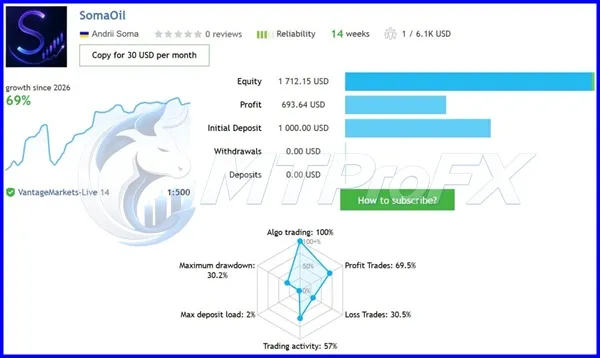
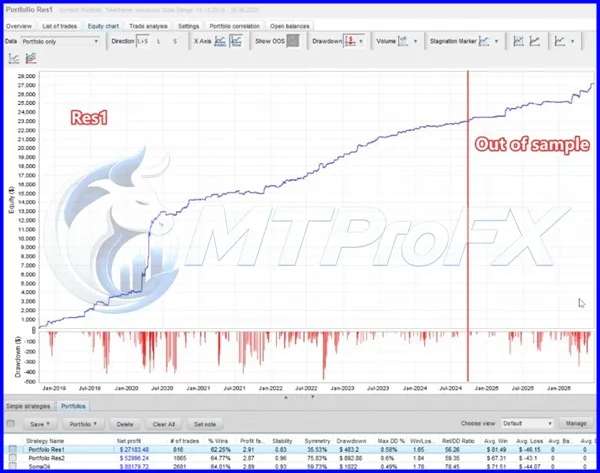
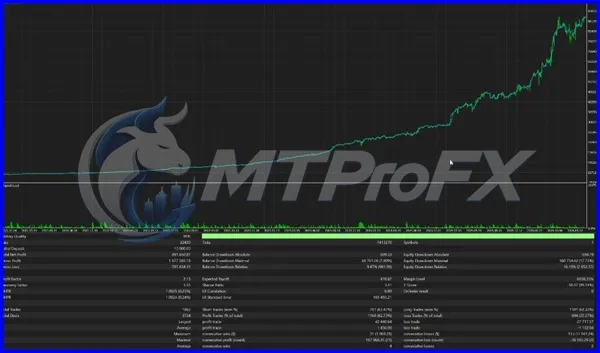
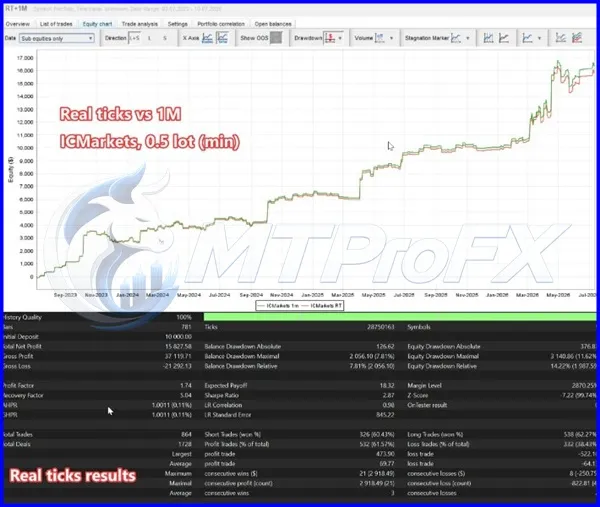
Conclusion
Before publishing or purchasing a product advertised as SomaOil EA MT5 v3.3, verify the exact version, technical specifications and legitimate source of the file. Treat historical results as evidence to investigate, not a promise of future returns.
What's Included
Login to add your review.
The oil-specific focus and built-in risk controls are worth investigating, although the settings and broker requirements need careful attention.